


Categories
- 3d CGI
- Amusements
- Animation
- Anime & Manga
- Art Materials
- Art Videos
- Blogroll
- Cartoons
- Color
- Comics
- Concept & Visual Dev.
- Creativity
- Digital Art
- Digital Painting
- Displaying Art on the Web
- Drawing
- Eye Candy for Today
- Gallery and Museum Art
- High-res Art Images
- Illustration
- Motion Graphics & Flash
- Museums
- Online Museums
- Outsider Art
- Painting
- Painting a Day
- Paleo Art
- Pastel, Conté & Chalk
- Pen & Ink
- Prints and Printmaking
- Reviews
- Sc-fi and Fantasy
- Sculpture & Dimensional
- Site Comments
- Sketching
- Storyboards
- Tools and Techniques
- Uncategorized
- Vector Art
- Videos & Podcasts
- Vision and Optics
- Watercolor and Gouache
- Webcomics
Archives
- April 2026
- March 2026
- February 2026
- January 2026
- December 2025
- November 2025
- October 2025
- September 2025
- August 2025
- July 2025
- June 2025
- May 2025
- January 2025
- December 2024
- November 2024
- October 2024
- September 2024
- August 2024
- June 2024
- April 2024
- March 2024
- February 2024
- January 2024
- December 2023
- November 2023
- October 2023
- September 2023
- August 2023
- July 2023
- May 2023
- April 2023
- March 2023
- February 2023
- January 2023
- December 2022
- November 2022
- September 2022
- August 2022
- July 2022
- June 2022
- May 2022
- April 2022
- March 2022
- February 2022
- January 2022
- December 2021
- November 2021
- October 2021
- September 2021
- August 2021
- July 2021
- June 2021
- May 2021
- April 2021
- March 2021
- February 2021
- January 2021
- December 2020
- November 2020
- October 2020
- September 2020
- August 2020
- July 2020
- June 2020
- May 2020
- April 2020
- March 2020
- February 2020
- January 2020
- December 2019
- November 2019
- October 2019
- September 2019
- August 2019
- July 2019
- June 2019
- May 2019
- April 2019
- March 2019
- February 2019
- January 2019
- December 2018
- November 2018
- October 2018
- September 2018
- August 2018
- July 2018
- June 2018
- May 2018
- April 2018
- March 2018
- February 2018
- January 2018
- December 2017
- November 2017
- October 2017
- September 2017
- August 2017
- July 2017
- June 2017
- May 2017
- April 2017
- March 2017
- February 2017
- January 2017
- December 2016
- November 2016
- October 2016
- September 2016
- August 2016
- July 2016
- June 2016
- May 2016
- April 2016
- March 2016
- February 2016
- January 2016
- December 2015
- November 2015
- October 2015
- September 2015
- August 2015
- July 2015
- June 2015
- May 2015
- April 2015
- March 2015
- February 2015
- January 2015
- December 2014
- November 2014
- October 2014
- September 2014
- August 2014
- July 2014
- June 2014
- May 2014
- April 2014
- March 2014
- February 2014
- January 2014
- December 2013
- November 2013
- October 2013
- September 2013
- August 2013
- July 2013
- June 2013
- May 2013
- April 2013
- March 2013
- February 2013
- January 2013
- December 2012
- November 2012
- October 2012
- September 2012
- August 2012
- July 2012
- June 2012
- May 2012
- April 2012
- March 2012
- February 2012
- January 2012
- December 2011
- November 2011
- October 2011
- September 2011
- August 2011
- July 2011
- June 2011
- May 2011
- April 2011
- March 2011
- February 2011
- January 2011
- December 2010
- November 2010
- October 2010
- September 2010
- August 2010
- July 2010
- June 2010
- May 2010
- April 2010
- March 2010
- February 2010
- January 2010
- December 2009
- November 2009
- October 2009
- September 2009
- August 2009
- July 2009
- June 2009
- May 2009
- April 2009
- March 2009
- February 2009
- January 2009
- December 2008
- November 2008
- October 2008
- September 2008
- August 2008
- July 2008
- June 2008
- May 2008
- April 2008
- March 2008
- February 2008
- January 2008
- December 2007
- November 2007
- October 2007
- September 2007
- August 2007
- July 2007
- June 2007
- May 2007
- April 2007
- March 2007
- February 2007
- January 2007
- December 2006
- November 2006
- October 2006
- September 2006
- August 2006
- July 2006
- June 2006
- May 2006
- April 2006
- March 2006
- February 2006
- January 2006
- December 2005
- November 2005
- October 2005
- September 2005
- August 2005
Relevant Blogs
Art, Painting & Sketch
- Gurney Journey
- Underpaintings
- Art and Influence
- Painting Perceptions
- Oil Painters of America
- Vasari Paint POV
- Flying Fox
- Urban Sketchers
- Bento (Smithsonian)
- Art Inconnu
- The Hidden Place
- Still Life
- Making a Mark
- The Art of the Landscape
- Exploring Color & Creativity
- Art Contrarian
- Artist A Day
- beinArt Surreal Art Collective
- Eye Level
- David Dunlop
- p.i.g.m.e.n.t.i.u.m
- CultureGrrl
- Joaquín Sorolla blog
- Artists in Pastel
“Painting a Day”
- A Painting a Day (Keiser)
- On Painting (Keiser)
- Julian Merrow-Smith
- Karen Jurick
- Jeffrey Hayes
- Carol Marine
- Abbey Ryan
- Daily Paintworks
Other Painting Blogs
- Virtual Gouache Land
- Neil Hollingsworth
- Marc Hanson
- Kevin Menck
- Marc Dalessio
- Larry Seiler
- Stapleton Kearns
- Colin Page
- Roos Schuring
- Hans Versfelt
- Titus Meeuws
- Régis Pettinari
- René Plein Air
- Belinda Del Pesco
- Robin Weiss
- Nathan Fowkes (Land Sketch)
- William Wray
- Frank Serrano
- Stephen Magsig
- Michael Chesley Johnson
- Twice a Week
- Sarah Wimperis
- Rob Adams
- Michael Cole Manley
- The Dirty Palette Club
- Mike Manley’s Draw!
Gallery Art & Illustration mix
Illustration
- Howard Pyle
- 100 Years of Illustration
- BibliOdyssey
- Illustration Art
- Today’s Inspiration
- Illustration Mundo
- Little Chimp Society
- Danny Gregory
- R D (John Martz
- Illustration Friday blog
- Monster Brains
- Illustrators & Illustrations (RU)
- Elwood H. Smith
- DaniDraws.com
- Designers Who Blog
- iSpot Blog
Sci-Fi & Fantasy
Illustration & Comics
Comics & Cartoons
- Comics Beat
- Robot 6
- Newsarama Blog
- Comic Vine
- Comics Alliance
- Forbidden Planet Int.
- Paolo Rivera
- Bolt City
- Flight
- Scott McCloud
- The Comics Journal
- Comixpedia
- Funnybook Babylon
- James Baker
- Middleton’s Sketchbook
- Boneville
- The Hotel Fred
- Paul Rivoche
- Daily Cartoonist
- Mad About Cartoons (William Wray)
- Digital Strips
Illustration & Concept
Animation & Concept
- Cartoon Brew
- Animation Blog
- Cold Hard Flash
- Concept Art World
- The CAB
- FY Concept Art
- Concept Ships
- Concept Robots
- John Nevarez
- Armand Serrano
- Marcos Mateu-Mestre
- all kinds of stuff (Kricfalusi)
- Yacin the faun (Man Arenas)
- Kelsey Mann
- Cre8tivemarks Blog
- Ice-Cream Monster Toon Cafe
- AAU Character & Creature Design
- AAU Animation Notes
- Articles and Texticles
Paleo & Scientific
Tools & Techniques
Other
Lists of Art Blogs
Art Image Resource Links
Historic Art Images
- Wikimedia Commons: Paintings
- Wikimedia Commons: Drawings
- The Athenaeum
- WikiArt (WikiPaintings)
- Google Art Project: Artists
- Google Art Project: Collections (Museums)
- ArtCyclopedia
- Web Gallery of Art
- Art Renewal Center
- Web Gallery of Impressionism
Auction Consolidation sites
Auction sites
- Sotheby’s
- Bonham’s
- Christies
- Heritage Auctions: Fine Art
- Heritage Auctions: Illustration
- Freeman’s Auctions
- Bukowskis
- Shannon’s
Image Search
Reverse Image Search (search by image)
- Tin Eye
- RevImg
- Google Image Search (camera icon)
- Bing Image Search (camera icon)
Promoting some friends and some clients of my website design business
- Twin Willows T’ai Chi studio in Wilmington DE. Taiji classes with Bryan Davis.
- Ray Hayward, Inspired Teacher of T’ai Chi ( Taiji ) in Minneapolis, Founder of Mindful Motion Tai Chi Academy
- OldHead Tattoo studio and Art Gallery in Wilmington DE. Tattoos and paintings by Bruce Gulick
- Sharon Domenico Art, pet portrait oil paintings
- Platinum Paperhanging, wallpaper hanging, Main Line and Philadelphia, PA
- Lisa Stone Design, interior designer, Main Line and Philadelphia, PA
- Studio12KPT, original art, prints, calendars and other custom printed items by Van Sickle & Rolleri
-
Building your web site
How to Display Your Art on the Web: Part 3
[This is part of a series of articles for which the introduction and list of articles is here. If you haven’t read the introduction yet, it would be helpful to read it first.]
Once you’ve found a web site hosting provider and acquired a domain name, you have to actually construct your web site, put together the HTML pages and attendant images that show up in the browser as a web site.
OK, let’s stop for a moment and think about what we’re doing here.
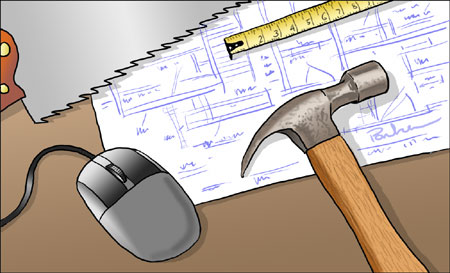
If you were going to build a new studio, that chances that you would go out to Home Depot, pick up a load of building materials and build it yourself are remote. You would hire a professional contractor to build it, someone who has spent years learning the skills necessary to build a structure, install windows, doors, plumbing and electricity, and not have it leak, lean to one side or fall down in a week.
For some reason, millions of people, who would otherwise not consider trying to build a bird house, think they should immediately be able to build a web site; which is also the province of professionals who have spent years learning their craft. Not only that, the do-it-yourselfers balk at the idea that they actually have to spend time and effort acquiring some knowledge and skills to build their own site. Hey, where’s the “Build a web site” button on my computer?” (It’s just above the pop-out cup-holder tray.)
I’m not saying you have to hire a professional, though that can be a good option if you can afford it, just that if you want a web site that doesn’t leak, lean to one side or fall down in a week, you need to be prepared to roll up your selves and learn to use a hammer and saw, or, in this case, learn a little bit about HTML and CSS — not a lot, just enough.
The alternatives
Hiring a professional
The analogy to building contractors is an apt one. People expect to ask web site designers how much a web site will cost and get a simple answer, but if you ask a contractor how much it will cost to build a house, they’ll look at you cross-eyed. A “house” can be a two-room bungalow or a 20 room McMansion. A professionally done web site can range from less than a thousand (if you’re lucky) to several thousand dollars, depending on what you want and who is doing the work. Also, like a building contractor, you have to put some effort into choosing a good one (that you can afford). The main thing to do is look at their current work, their own web site and the examples of other sites they’ve done. Are they attractive, easy to use and navigate, or do they get in their own way by being too clever? (See my article on How Not to Display your Artwork on the Web.)Some web site designers are much more reasonable than others. In general an independent individual designer can be less expensive than a design firm with lots of employees and overhead (though not always). You can get a feeling for the size of client they usually deal with from their portfolio (if they designed a site for ATT or IBM, you can’t afford them). Word of mouth is good, particularly if someone you know has had a good experience. If you see a site on the web that you particularly admire, look for a byline for the designer somewhere on the home page. As part of a future post, I’ll list some places where you can cruise for good designs, both for your own inspiration and potentially to find good designers.
Don’t be reluctant to talk to them on the phone and get a feeling for what it would be like to deal with them. Ask questions about their process and procedure for estimates, fees, etc. As I said, just like a building contractor. If you give them a detailed picture of what you want, they should be able to give you a reasonably firm esitmate before you commit to anything.
Web site designers generally will not want to take your brilliant design and implement it for you (though some may). They want to create the design, and this is understandable; it’s their art that they can hang in their own gallery (portfolio). However, you can, should and must tell them exactly what you want. You’ll need to do the planning for what you want to include and how it should be arranged whether you build the site yourself or not; though a good professional will help you plan out your site and guide you through the process. Your designer may also be able to arrange your site so that you can edit it yourself using something like Adobe Contribute, though that can cost a little more to set up initially.
In the next few posts in this series, I’ll try to discuss some of the design issues you need to apply to your site, whether you have it designed for you by a pro or tackle it yourself.
Blogs as web sites
As I mentioned in my article on choosing a web hosting company, a blog, when used with “pages” instead of “posts” can make an acceptable substitute for a regular web site. This path has its limitations, but may be a good option for getting up and running with a web presence quickly. If you’re not limiting yourself to the free online blog accounts, that leave you with domain names like cheapbastard.blogspot.com, a real web hosting account usually comes with an option to host a blog as well as a site. Web hosting companies offer blogging software like Movable Type and WordPress.You should be able to arrange with the hosting provider to install the blog in such a way that your own domain name points to the main page of the blog. This is how lines and colors is set up. In this case the main page is set up as a blog but the pages for About, Suggest a Site, Link, and Colophon are set up as static pages rather than posts, and have no dates or comments. There are many free templates, or “themes”, for the major blogging platforms that will allow you to at least have a semi-custom design.
Image hosting services
If you’re just putting your work up so your mom can be “so proud of you” and your friends can say “awesome”, a Flickr account, MySpace page or other image hosting or group web space is fine. If you want to present a professional web presence, that ain’t it.Site builders
Unlike templates (see below), which are just pre-made web pages that you customize in a text editor or dedicated web page editor, site builders are online interfaces (with a variety of dumb names) that some web hosting companies provide in an attempt to convince you that you are just two steps away from web site nirvana, the ability to build your own house, er.., web site, without seeing a single piece of horrid HTML code, if only you will sign up for their hosting plans.What that promise belies is that these things, while they may fulfill their intention to shield you from exposure to any scary, itch-producing HTML code, are often so clunky, awkward, restrictive, and hard to deal with, that the time spent on learning your way through their horrible interfaces to try to build something that doesn’t look like a doghouse for clowns could be much better put to use learning a little bit about actually building a web site, something you can use anywhere, not just on one proprietary “site builder” that may or may not exist next year. There may be some good ones out there, I certainly haven’t seen all of them, but my impression so far is not good.
CMS – Content Management Systems
These are much more sophisticated and elegant than site builders, and some good ones are available for free, but I think some of the same limitations apply – you have to spend time learning to use a particular proprietary system, instead of basic site building knowledge that you can apply anywhere.Templates
Just like you can buy a prefab house, you can get either commercially available (for around $60) or free web site templates, ready-made pages that you can customize and use for your site design. However, just like a modular home, you still have to prepare a foundation and pick up hammer and saw to customize; and, just like a modular home, chances are that it will look exactly like your neighbor’s modular home. It can be a good place to start, though, and I’ll give you some template resources later. With a little knowledge of HTML/CSS you can turn a template into a semi-custom site with your own unique stamp.Some of the free template sites are just that, free web page templates provided by generous individuals or developers who want some traffic. Others, however, are shills for paid templates or other services. When choosing free templates, like all free stuff, let the non-buyer beware — quality varies wildly.
HTML and CSS
Oh no! Code!!! Akkk! The dreaded specter of high school math rears it’s ugly parenthetical head and starts breathing asterisks down your neck at the very thought of learning code.
The good news
HTML is not rocket surgery, though it is a little bit of brain science. At it’s most basic, it’s pretty simple. HTML stands for “HyperText Markup Language”. Hypertext is text that can have links in it to other documents, and is the basis of the web. A markup language is a set of symbols (“tags”) that “mark up”, or set off, bits of text to be handled differently.For instance, if you surround a word with tags like this: <em>word</em>; you have marked it up for emphasis, and that word will be rendered in italics by a web browser. The <em> marks the beginning of the passage you want italicized, the same tag with a forward slash in it, </em>, means the end of that passage. The browser will hide the actual tags from view in the final rendering of the page.
There is an excellent book called HTML for the World Wide Web, with XHTML and CSS, A Visual QuickStart Guide that I recommend highly. “XHTML” is a newer and slightly more formal version of HTML that is no more difficult to learn. It’s what I use.
CSS – The Web Gods’ Gift to Designers
So what’s the “CSS” part of HTML/CSS? HTML simply wasn’t made to do what it’s doing. It was supposed to be a simple markup language for plain text documents with a few images in them, for use by bespectacled geeks in universities and brown-shoed file clerks in the government, (the original purpose of the Internet was to link those sets of institutions together in a network). When some geeks found out how cool HTML was for other stuff, and the idea caught on, the demand to make HTML pages look like something other than a TPS Report grew, and HTML got pressed into service as a makeshift “page description language”; a task for which it was ill-suited. (An example of an actual page description language would be Postscript, the code underneath Illustrator, InDesign, and PDF documents, that allows them to display a page exactly as designed.)After years of horrible kludges with nested tables, spacer GIFs and pages littered with garbage like <FONT> tags, Cascading Style Sheets (CSS) were given to geekkind by the World Wide Web Gods to free us from bondage and lift our pages from the stone age. Cascading Style Sheets let you apply styles to HTML tags, so you could, for example, tell any <em>word</em> in italics that it should also be set in 9point, bold type, a font family of Georgia, with a specific color, spacing, background, border and so on, so that word can be this word. CSS goes a long way toward making HTML behave like a real page description language and, even though it seems like one more thing to learn, it actually simplifies the code in the long run.
If you want an amazing example of how powerful CSS is, take a stroll through the CSS Zen Garden. Every design in the column of links is the exact same HTML page; each of the astonishingly different layouts is generated only by a different style sheet and group of background images applied to that page.
The Bad News
While not necessarily complicated, HTML can be picky and quirky; a misplaced quote mark can send an entire page into a tailspin; and a page that looks fine in Firefox, Opera, Omniweb, Safari and even one version of Internet Explorer can look completely wonky in another version of Internet Explorer; largely because the people who write this software often don’t agree on how the standards should be implemented, or just ignore them altogether. (Those of us who do web site design professionally spend a lot of time cleaning up after sloppy and arrogant browser programming, often on the part of The Giant Software Company That Shall Not Be Named.)Also HTML can get complicated if you get too ambitious, which is why I suggest you put a temporary hold on your plans to build a 20 story glass and steel studio building with curved walls, 12 story atrium, underground parking and revolving roof-top restaurant, and start with something a little more like a vacation cabin.
The good news
The web is all about HTML and CSS, and there are hundreds of free resources out there for you; and if you keep it simple you can avoid most of the cross-browser wonkiness.Tools
More good news: you don’t need to spend $$ to make a web site. You can edit HTML in the simple text editor that comes with your operating system, like TextEdit for the Mac (choose “Plain Text” from the Format menu), or NotePad (not WordPad) for Windows. However, it’s much nicer to have a dedicated tool that color-codes your text, provides built in tools for creating HTML tags, checks the code for mistakes and provides other features to make your life a little easier. If you’re working on a Mac, BareBones, the creator of BBEdit, the amazing super-powered text editor that many professionals use to edit their HTML code, offers a free junior version called TextWrangler. On the Windows side, try Notepad++.
You can get serious professional-level HTML editors like Dreamweaver or GoLive (though the latter is unfortunately on its way out now that Adobe owns both). These can be used in WYSIWYG (What You See Is What You Get) mode, meaning you can view the page more or less the way it looks in a browser as you create or edit it. This is a good feature, but you still need to know how to deal with HTML code to really do much. These editors, though, may be expensive overkill for someone who is just building and maintaining one web site and not embarking on a career of dealing with other people’s sites, and they have their own learning curve. (If you are planning on eventually bulilding a large, complex site, they include some powerful site management features, and Dreamweaver comes with some good built-in templates.)
You can also get a piece of horrible trash masquerading as a web page editor, known as Microsoft Front Page (don’t get me started). You can even export HTML from things like Microsoft Word, if you don’t mind taking a chance (as with Front Page) that your pages may look like a train wreck in non-Microsoft browsers. There is supposed a new, “real” web page editor in Microsoft’s new graphics and web suite. I’ll try to reserve judgement, but the company’s track record with HTML is not good.
The secret free WYSIWYG web page editor.
It’s only a “secret” because it’s not well publicized and not easy to find, but the Mozilla open source suite of web tools called SeaMonkey (don’t ask me why it’s called SeaMonkey, I don’t even want to know) comes with an excellent little WYSIWYG HTML editor called Composer, that used be part of previous incarnations of Netscape. (It’s accessed from one of the menus in the SeaMonkey browser.)View Source
Like Salvador Dali peeking under the skin of the sea, you can peek under the skin of the web at any time by choosing “View: View Source” (or “Page Source”) in your web browser. This will pop up a new window showing the HTML code underlying that page. If you choose complex pages, what you see may be intimidating and confusing, as I said, HTML can be as complicated as you want it to be; but if you choose that option on some simple pages, you can see how they are put together. You can also save that page to your computer and open it in your HTML editor for a better look. The CSS styles are often applied from a separate style sheet document, with a file name like whatever.css, attached to the HTML document with a link tag in the upper part of the HTML page.There is a terrific little plug-in for Firefox called Web Developer’s Toolbar, that is great for seeing style sheets, outlining blocks of code, and otherwise dissecting web pages like the mad rocket scientist you know you long to be.
Learning not to hit your thumb with a hammer
You still have to make a lot of design desicions before you actually build your real site, but in the meantime, try downloading an HTML editor, whether text-based, WYSIWYG, or both, and play (operative word: play, not stress out) with making a bird house or two before you tackle building your dream home.You could try using or customizing a simple free template, or build some simple pages from scratch. You may even find that your Lego/Tinkertoy/Erector Set wielding inner child is having fun putting something together and making it work!
Resources
Blogs as web sites
List of Blogging software (available on real hosting accounts)
Blog software comparison chart
Themes for WordPress blogs
Themes for Movable Type blogsTemplates and Layouts
CSS Layouts – Web Developer’s Handbook – list of lists
Free site templates on Open Web Design
Free CSS templates
More free templates
CSS Layouts (basic layouts with columns that you customize)
CSS layouts from Blue RobotBooks
HTML for the World Wide Web, with XHTML and CSS, A Visual QuickStart GuideHTML tutorials
Web Design from Scratch
HTML Dog – beginner
w3schools.com
Getting started with HTML
About.com
Webmonkey (dated but still good)
WDVL Intro to HTML
Web Site Primer
How to Create a Website
Do You Need to Learn HTML? from Crafted WebmasterCSS Tutorials
Webmonkey Stylesheets Guide
House of Style
HTML DogHTML Reference
Web Developer’s Virtual Library
Webmonkey HTML Cheatsheet
HTML Help from Web Design Group
HTML DogCSS resources
Holy CSS Zeldman!
MezzoBlue
University of MinnesotaHTML editors
Lists:
HTML Editors list on About.com
Pure Mac list of HTML editors for Mac
Text based:
TextWrangler free text based HTML editor for Mac – excellent
Notepad++, free text-based HTML editor for Windows
WYSIWYG:
SeaMonkey – includes Composer, free WYSIWYG editor for all platforms
N/vu – free, open-source WYSIWYG editor for Mac, Windows and LINUX
Mac only:
Rapidweaver – Easy, template based WYSIWYG editor (approx $50)
Freeway Express Mac WYSIWYG editor (approx $100)
iWeb – WYSIWYG editor – part of iLife ’08 – ships with new Macs
Professional:
Adobe Dreamweaver (professional level WYSIWYG editor – about $400)Web Developer’s Toolbar – plug-in for FireFox for looking at HTML CSS in pages
Next: Planning your web site
Categories:
-
Zhaoming Wu
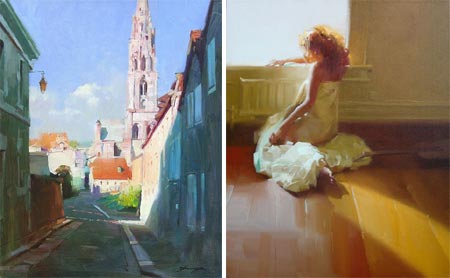
Zhaoming Wu is a Chinese painter and teacher who has been a professor of painting at the Guangzhou Academy of Fine Art in China and is currently an instructor of panting at the Academy of Art University in San Francisco.His work has garnered awards in China, Europe and the U.S. and has been featured in a number of publications including Art of the West and International Artist Magazine.
Wu paints figures, portraits and landscapes in an open, extremely painterly style, in which the character of the paint-laden brushstrokes seem as important as the forms they define. The brushstrokes, in fact, often are the forms, with deceptively simple textured strokes that make up folds of cloth or the shapes of buildings.
In his landscapes and room interiors, Wu emphasizes the geometry of the forms and sets aside areas of color as distinct shapes, deliberately blurring or obscuring detail in favor of composition and color.
Even his drawings are “painterly”. There is a nice selection of drawings on his site, in which contrast and tone take on the role color plays in his paintings, edges are often blurred or smeared, and background tones roughed out in a manner evocative of brush strokes.
[Suggestion courtesy of Evan Waldinger]
Categories:
-
Ron Mueck

I don’t often devote a lot of attention to sculpture, but, as I noted in my recent post on Claes Oldenburg, one of the things art does at its finest is to shake up our preconceptions and show us the world with fresh eyes.Ron Mueck’s astonishing sculptures of ordinary, non-heroic people do just that. Usually unclothed, his figures are strikingly realistic in terms of the physical appearance of flesh, hair, and the textures and colors of human beings; right down to finger and toenails, blemishes and moles, goosebumps, individual head and body hairs inserted one by one, and the appearance of superficial veins beneath the skin.
Life-like replicas of human beings, no matter how realistic, would not in themselves necessarily alter our perceptions. Mueck does that by ingenious manipulation of scale. His spookily human sculptures are not life size. Some are gargantuan, others slightly larger than life, like his eight foot high standing pregnant woman, some are quite small and others are about half life-size, like his startling sculpture of his dead father, which helped establish his reputation as a gallery artist.
Mueck’s sculptures are made of fiberglass and silicone and crafted with techniques Mueck acquired in his previous career as a special effects artist, working on such films as Labyrinth.
You may have seen mention on the web of his earlier, somewhat grotesque, giant babies, but I think his more recent and sophisticated work is much more interesting.
In 2006 the National Gallery in London invited Mueck to become an artist in residence and create sculptures inspired by works in the museum’s collection of old masters. There is a half-hour documentary that gives a brief overview of Mueck and his work and follows him through the extensive and painstaking process of creating his sculpture of the standing pregnant woman.
Mueck starts with the traditional sculptor’s path of sketches, preliminary clay sculptures, a small but detailed maquette and then a full size, fully realized clay sculpture. It is in the casting in fiberglass and modeling in silicone that the process diverges from the traditional methods of casting in bronze.
Even in photographs, the realism and the element of scale make Mueck’s work striking. I haven’t had the chance to see his sculptures “in the flesh”, so to speak, but the effect must be startling.
Note: Some may consider his realistic depictions of naked humans NSFW.
[Suggestion courtesy of Kevin Sparkman]
Categories:
-
Laura Wilder

I first came across Laura Wilder’s unusual “house portraits” when doing research a year or so ago for a project I was working on with FusionSpark Media called the Florida-Friendly Interactive Yard.I was looking for reference on various styles of rendering houses and I was struck by Wilder’s approach.
Though she sometimes uses watercolor or pen and ink in a more conventional way, many of her images of houses are done in gouache in a simplified, graphic style similar in appearance to woodblock prints. The ability of gouache to lay down flat tones, which has made it a favorite of illustrators over the years, is perfect for this application.
Working from photographic reference, Wilder manages to abstract (in the original sense of that word) the essential shapes in an image into areas of graphic color that are similar to the flat areas inherent in the nature of block printing.
In some of the detail images in her section of portraits, she shows the reference photos next to the finished piece.
Her approach is very influenced by the graphic style and subject matter of the Arts and Crafts movement from the turn of the last century, and she also has galleries of posters and prints in that vein.
She pays particular attention to artisans and craftspeople, and seems to feel a closer kinship with them than with the traditional art world. One of her galleries is devoted to depictions of artisans at work.
Categories:
-
Granville Redmond

Granville Redmond was born in Philadelphia in the early 1870’s. He became deaf as the result of a bout of scarlet fever when he was around three, and his family moved to California, perhaps prompted by the opportunity afforded their son at the Berkeley School for the Deaf (now the California School for the Deaf). There his artistic inclinations were encouraged and he went on to study at the California School of Design in San Francisco.He won a scholarship from the California School of the Deaf that allowed him to travel to Paris and study at the renowned Academie Julian, and had a large canvas accepted at the prestigious Paris Salon.
Though he came to California and to painting by a different route, his influences and painting excursions around California put him in the company of the other turn of the century California plein air painters, who are often referred to as “California impressionists” (see my posts on Guy Rose and Hanson Puthuff).
Like some of the other California painters, Redmond encountered the state’s amazing broad valleys carpeted with great expanses of yellow and purple California poppies.
Redmond responded with large, vibrantly intense canvasses overflowing with unusual admixtures of hues. These are contrasted with his darker, moodier paintings of overcast or misty days and subdued nocturnes.
While living in Los Angeles Redmond encountered and became friends with Charlie Chaplin, who was fascinated with the expressiveness of American Sign Language, and asked Redmond to help him develop some of his silent movie pantomime techniques. Chaplin became a patron of Redmond, provided him with a studio on the movie lot while they were collaborating, collected his paintings and featured him in small parts in his movies; notably as the sculptor in City Lights.
Redmond’s work was compared to that of Monet and Pissarro, but, like most of the American painters influenced by French Impressionism, he went his own way.
There is a fairly extensive gallery of Redmond’s work on Steven Stern’s California Paintings gallery site. Unfortunately, navigation is by way of “too clever for their own good” ASP and JavaScript tricks, so I can’t give you a direct link. Go to this page and then choose Granville Redmond from the alphabetical list.
This is a commercial gallery and some of the images are marred with an unnecessarily obnoxious little “SOLD” banner that looks like it belongs on K-mart prints (and could be below the image rather than on top of it if they wanted to show respect for their artists), but the marking isn’t large and you can still get a good feeling for Redmond’s paintings.
There is also a commercial gallery called the Granville Redmond Gallery that deals in his paintings, but while the site has some bio information, it is lacking in images.
Categories:
-
Vincent Dutrait

French illustrator Vincent Dutrait is well known in France and Asia, particularly in fantasy and role playing gaming circles, but not very familiar here in the U.S.Dutrait was born in Provence and now lives and works in Seoul, South Korea. He cites inspiration from great American illustrators of the Brandywine school like Howard Pyle and N.C. Wyeth, as well as contemporary fantasy artists like Jean-Michel Nicollet, John Howe and Angus McBride.
His web site is in French, but it’s not difficult for non-French speakers to navigate. Most of the major sections have alternate names in English and the rest isn’t difficult to figure out.
The “News” section is essentially a blog, with articles arranged by date, on which he posts and discusses some of his most recent work. You can see a sort of overview of his work in the Essential section of the Galleries.
Thought he he best known for his illustrations for role playing games and fantasy, adventure and science fiction, some of his most interesting work in in the illustrated books section; with galleries of illustrations for titles like The Knights of the Round Table, Robinson Caruso, Treasure Island, Alexander the Great, and The Count of Monte Cristo, which show his interest in classic stories, historical illustration and the traditions of the illustrators of the Brandywine school.
The info section, like most of the site’s text content, is in French, but you can try a Google Translate version.
There is also a section of wallpapers where you can find nice high-resolution images that make it easier to see the detail in his work.
I don’t know much about Dutrait’s working methods, the promised page of tutorials has some image linking problems. Addendum: Vincent has written with direct links to the tutorials and the image links have been refreshed, there are tutorials on: Scanning large illustrations, Preparing the surface and Completing the image. The tutorials are nicely done, with enlarged details.
It looks to me like he starts with a pencil drawing and then applies color in a way that leaves some of the pencil to show through as line and texture. Addendum: on viewing the tutorials, I can see that he is working, in this case, in acrylic over an ink drawing, adding some textures and details with colored pencil.
Texture plays a prominent role in his style, and is one of the most appealing aspects of his work, with a frequent use of color hatching, somewhat similar to the way color is applied in egg tempera. A lot is accomplished with suggestions of texture, a few strategically places areas of alternate color within a larger area can give your eye the feeling of a much more complete texture.
If you compare some of his drawings to his finished work, you can see where I get my impression of his working process, which leaves much of his work with an appealing feeling of being somewhere between drawing and painting.
Categories:



Charley’s Picks
Bookshop.org
(Bookshop.org affilliate links; sales benefit independent bookshop owners; I get a small percentage to help support my work on Lines and Colors)

John Singer Sargent: Watercolors


Urban Sketching: Understanding Perspective


Charley’s Picks
Amazon
(Amazon.com affiliate links; sales go to a larger yacht for Jeff Bezos; but I get a small percentage to help support my work on Lines and Colors)
John Singer Sargent: Watercolors
Urban Sketching: Understanding Perspective