


Categories
- 3d CGI
- Amusements
- Animation
- Anime & Manga
- Art Materials
- Art Videos
- Blogroll
- Cartoons
- Color
- Comics
- Concept & Visual Dev.
- Creativity
- Digital Art
- Digital Painting
- Displaying Art on the Web
- Drawing
- Eye Candy for Today
- Gallery and Museum Art
- High-res Art Images
- Illustration
- Motion Graphics & Flash
- Museums
- Online Museums
- Outsider Art
- Painting
- Painting a Day
- Paleo Art
- Pastel, Conté & Chalk
- Pen & Ink
- Prints and Printmaking
- Reviews
- Sc-fi and Fantasy
- Sculpture & Dimensional
- Site Comments
- Sketching
- Storyboards
- Tools and Techniques
- Uncategorized
- Vector Art
- Videos & Podcasts
- Vision and Optics
- Watercolor and Gouache
- Webcomics
Archives
- April 2026
- March 2026
- February 2026
- January 2026
- December 2025
- November 2025
- October 2025
- September 2025
- August 2025
- July 2025
- June 2025
- May 2025
- January 2025
- December 2024
- November 2024
- October 2024
- September 2024
- August 2024
- June 2024
- April 2024
- March 2024
- February 2024
- January 2024
- December 2023
- November 2023
- October 2023
- September 2023
- August 2023
- July 2023
- May 2023
- April 2023
- March 2023
- February 2023
- January 2023
- December 2022
- November 2022
- September 2022
- August 2022
- July 2022
- June 2022
- May 2022
- April 2022
- March 2022
- February 2022
- January 2022
- December 2021
- November 2021
- October 2021
- September 2021
- August 2021
- July 2021
- June 2021
- May 2021
- April 2021
- March 2021
- February 2021
- January 2021
- December 2020
- November 2020
- October 2020
- September 2020
- August 2020
- July 2020
- June 2020
- May 2020
- April 2020
- March 2020
- February 2020
- January 2020
- December 2019
- November 2019
- October 2019
- September 2019
- August 2019
- July 2019
- June 2019
- May 2019
- April 2019
- March 2019
- February 2019
- January 2019
- December 2018
- November 2018
- October 2018
- September 2018
- August 2018
- July 2018
- June 2018
- May 2018
- April 2018
- March 2018
- February 2018
- January 2018
- December 2017
- November 2017
- October 2017
- September 2017
- August 2017
- July 2017
- June 2017
- May 2017
- April 2017
- March 2017
- February 2017
- January 2017
- December 2016
- November 2016
- October 2016
- September 2016
- August 2016
- July 2016
- June 2016
- May 2016
- April 2016
- March 2016
- February 2016
- January 2016
- December 2015
- November 2015
- October 2015
- September 2015
- August 2015
- July 2015
- June 2015
- May 2015
- April 2015
- March 2015
- February 2015
- January 2015
- December 2014
- November 2014
- October 2014
- September 2014
- August 2014
- July 2014
- June 2014
- May 2014
- April 2014
- March 2014
- February 2014
- January 2014
- December 2013
- November 2013
- October 2013
- September 2013
- August 2013
- July 2013
- June 2013
- May 2013
- April 2013
- March 2013
- February 2013
- January 2013
- December 2012
- November 2012
- October 2012
- September 2012
- August 2012
- July 2012
- June 2012
- May 2012
- April 2012
- March 2012
- February 2012
- January 2012
- December 2011
- November 2011
- October 2011
- September 2011
- August 2011
- July 2011
- June 2011
- May 2011
- April 2011
- March 2011
- February 2011
- January 2011
- December 2010
- November 2010
- October 2010
- September 2010
- August 2010
- July 2010
- June 2010
- May 2010
- April 2010
- March 2010
- February 2010
- January 2010
- December 2009
- November 2009
- October 2009
- September 2009
- August 2009
- July 2009
- June 2009
- May 2009
- April 2009
- March 2009
- February 2009
- January 2009
- December 2008
- November 2008
- October 2008
- September 2008
- August 2008
- July 2008
- June 2008
- May 2008
- April 2008
- March 2008
- February 2008
- January 2008
- December 2007
- November 2007
- October 2007
- September 2007
- August 2007
- July 2007
- June 2007
- May 2007
- April 2007
- March 2007
- February 2007
- January 2007
- December 2006
- November 2006
- October 2006
- September 2006
- August 2006
- July 2006
- June 2006
- May 2006
- April 2006
- March 2006
- February 2006
- January 2006
- December 2005
- November 2005
- October 2005
- September 2005
- August 2005
Relevant Blogs
Art, Painting & Sketch
- Gurney Journey
- Underpaintings
- Art and Influence
- Painting Perceptions
- Oil Painters of America
- Vasari Paint POV
- Flying Fox
- Urban Sketchers
- Bento (Smithsonian)
- Art Inconnu
- The Hidden Place
- Still Life
- Making a Mark
- The Art of the Landscape
- Exploring Color & Creativity
- Art Contrarian
- Artist A Day
- beinArt Surreal Art Collective
- Eye Level
- David Dunlop
- p.i.g.m.e.n.t.i.u.m
- CultureGrrl
- Joaquín Sorolla blog
- Artists in Pastel
“Painting a Day”
- A Painting a Day (Keiser)
- On Painting (Keiser)
- Julian Merrow-Smith
- Karen Jurick
- Jeffrey Hayes
- Carol Marine
- Abbey Ryan
- Daily Paintworks
Other Painting Blogs
- Virtual Gouache Land
- Neil Hollingsworth
- Marc Hanson
- Kevin Menck
- Marc Dalessio
- Larry Seiler
- Stapleton Kearns
- Colin Page
- Roos Schuring
- Hans Versfelt
- Titus Meeuws
- Régis Pettinari
- René Plein Air
- Belinda Del Pesco
- Robin Weiss
- Nathan Fowkes (Land Sketch)
- William Wray
- Frank Serrano
- Stephen Magsig
- Michael Chesley Johnson
- Twice a Week
- Sarah Wimperis
- Rob Adams
- Michael Cole Manley
- The Dirty Palette Club
- Mike Manley’s Draw!
Gallery Art & Illustration mix
Illustration
- Howard Pyle
- 100 Years of Illustration
- BibliOdyssey
- Illustration Art
- Today’s Inspiration
- Illustration Mundo
- Little Chimp Society
- Danny Gregory
- R D (John Martz
- Illustration Friday blog
- Monster Brains
- Illustrators & Illustrations (RU)
- Elwood H. Smith
- DaniDraws.com
- Designers Who Blog
- iSpot Blog
Sci-Fi & Fantasy
Illustration & Comics
Comics & Cartoons
- Comics Beat
- Robot 6
- Newsarama Blog
- Comic Vine
- Comics Alliance
- Forbidden Planet Int.
- Paolo Rivera
- Bolt City
- Flight
- Scott McCloud
- The Comics Journal
- Comixpedia
- Funnybook Babylon
- James Baker
- Middleton’s Sketchbook
- Boneville
- The Hotel Fred
- Paul Rivoche
- Daily Cartoonist
- Mad About Cartoons (William Wray)
- Digital Strips
Illustration & Concept
Animation & Concept
- Cartoon Brew
- Animation Blog
- Cold Hard Flash
- Concept Art World
- The CAB
- FY Concept Art
- Concept Ships
- Concept Robots
- John Nevarez
- Armand Serrano
- Marcos Mateu-Mestre
- all kinds of stuff (Kricfalusi)
- Yacin the faun (Man Arenas)
- Kelsey Mann
- Cre8tivemarks Blog
- Ice-Cream Monster Toon Cafe
- AAU Character & Creature Design
- AAU Animation Notes
- Articles and Texticles
Paleo & Scientific
Tools & Techniques
Other
Lists of Art Blogs
Art Image Resource Links
Historic Art Images
- Wikimedia Commons: Paintings
- Wikimedia Commons: Drawings
- The Athenaeum
- WikiArt (WikiPaintings)
- Google Art Project: Artists
- Google Art Project: Collections (Museums)
- ArtCyclopedia
- Web Gallery of Art
- Art Renewal Center
- Web Gallery of Impressionism
Auction Consolidation sites
Auction sites
- Sotheby’s
- Bonham’s
- Christies
- Heritage Auctions: Fine Art
- Heritage Auctions: Illustration
- Freeman’s Auctions
- Bukowskis
- Shannon’s
Image Search
Reverse Image Search (search by image)
- Tin Eye
- RevImg
- Google Image Search (camera icon)
- Bing Image Search (camera icon)
Promoting some friends and some clients of my website design business
- Twin Willows T’ai Chi studio in Wilmington DE. Taiji classes with Bryan Davis.
- Ray Hayward, Inspired Teacher of T’ai Chi ( Taiji ) in Minneapolis, Founder of Mindful Motion Tai Chi Academy
- OldHead Tattoo studio and Art Gallery in Wilmington DE. Tattoos and paintings by Bruce Gulick
- Sharon Domenico Art, pet portrait oil paintings
- Platinum Paperhanging, wallpaper hanging, Main Line and Philadelphia, PA
- Lisa Stone Design, interior designer, Main Line and Philadelphia, PA
- Studio12KPT, original art, prints, calendars and other custom printed items by Van Sickle & Rolleri
-
Howtoons

I’ve long been fascinated with the idea of comics and cartoons as a medium for instruction or teaching. Here’s an interesting take on that idea.Howtoons is a series of how-to projects for kids (or adults going through a second childhood) presented as comic strips or cartoon-like panels. In them we’re introduced to Tucker and Celine, fantasy characters of brother and sister who are tired of watching TV and bored with video games (I did say fantasy characters), and so take to inventing “Tools of Mass Construction”; making playthings and learning projects out of clothespins, soda bottles, duct tape, cardboard and other kid-ready materials.
Their how-to projects are collected as a book, also just called Howtoons, and are presented in a more limited collection online.
The projects are sometimes presented as a comic strip and sometimes as a single panel, often accompanied by downloadable PDF’s that can be printed. Sometimes the printable PDF’s are the project, one of which is that great old standard of a zoetrope, one of the oldest and most basic methods of creating animation.
Other online projects include a soda bottle submarine, a cartoon explanation of the Beaufort Scale (for measuring the force of wind at sea), and a “Rola-Bola” (image above).
The site is rounded out with Library that includes articles on comic book artists like Kirby, Toth, Eisner and Herriman, and links to other related do-it-yourself or how-to sites (like the terrific Exploratorium), as wall as a nicely done set of links to Wikipedia articles about historical and contemporary figures who are Legends of art and invention.
There is also a blog, where the contributors discuss their projects and other how-to and related resources on the web.
One thing the site is lacking is a “Credits” or “About Us” page. The book is credited to Saul Griffith, Joost Bonsen and Nick Dragotta, with the illustration credits going to Dragotta, who has done some work for Marvel Comics. They apparently get a little help from Ryan McKinley and Phil Torrone.
[Link via Neatorama]
Categories:
-
Flesk Publications (update)

Flesk Publications is a small publisher specializing in art books, and particularly in titles that would be of interest to many lines and colors readers.I first wrote about Flesk two years ago as one of my first posts for lines and colors. At the time the focus of Flesk’s publishing efforts was on two of the greatest pen and ink illustrators ever to put pen to paper, Joseph Clement Coll and Franklin Booth.
Since then, the line of titles has been expanded to include contemporary comics artists Mark Schultz and Steve Rude as well as illustrator and gallery artist James Bama.
Flesk’s original collection of Coll’s work, Joseph Clement Coll: The Art of Adventure has been followed up with a second volume, Joseph Clement Coll: A Legacy in Line. For fans of pen and ink illustration (like myself) the publication of these two volumes was a major cause for celebration. Prior to that, the major book on Coll, The Magic Pen of Joseph Clement Coll, had been long out of print. There is a small gallery of Coll’s work on the Flesk site and an illustrated bio on BPIB.
Flesk’s book on Booth, Franklin Booth: Painter with a Pen, has itself been out of print for a little while, but has recently been republished and is again available. For fans of this amazing illustrator, whose unique approach to pen and ink has never been duplicated, this book is an excellent collection and a nice compliment to Franklin Booth: American Illustrator, a title I have previously recommended from Auad Publishing. There is a gallery of Booth’s work on the Flesk site, though the Booth gallery on the Auad site is more extensive, with larger images, and and offers a better introduction to Booth’s work. There is virtually no redundancy between the Flesk and Auad books, and both are superb.
Flesk has just released the third in a series called Mark Schultz: Various Drawings. All three editions are full of beautifully rendered drawings by this contemporary comics artist, whose work shows the influence of great comics artists like Wally Wood, Alex Raymond and Al Williamson.
Due for release in November is a new book, Steve Rude: Artist in Motion. Rude is also a a contemporary comics artist, known for his work on Nexus, a very unique take on the idea of costumed heroes, co-created with writer Mike Baron. Rude also shows the influence of great comics artists and illustrators, like Russ Manning and Andrew Loomis.
Flesk has also published James Bama: American Realist, again filling a gap for fans of this terrific illustrator and gallery artist.
In the works are a book on Gary Gianni’s work on Prince Valiant and a new storybook by Schultz. You may still be able to pick up a copy of the recent issue of Illo, in which publisher John Fleskes interviews Mark Schultz.
There are also short interviews with Schultz (also here) on the Flesk site about the book projects.
There is a 2006 interview with Fleskes by Bill Baker on World Famous Comics.
Fleskes also mantains a blog with infor about the Flesk Publications projects and other topics of related interest. There a separate News section on the site.
There are galleries on the site for Coll, Booth, Schultz and Rude. (Image above, clockwise from top left: Joseph Clement Coll, Franklin Booth, Mark Schultz, Steve Rude.)
Categories:
-
Designing your web site

How to Display Your Art on the Web: Part 5
[This is part of a series of articles for which the introduction and list of articles is here. If you haven’t read the introduction yet, it would be helpful to read it first.]
OK, big news flash here, in case you weren’t aware of it, but artists, even good artists, don’t necessarily know squat about graphic design. (Gasp!) Yes, true fact: art and design are two different skill sets, even though there is some cross over. Sorry if I’m stepping on any toes, but if you want proof, look no further than the endless array of horribly designed artists’ web sites already out there.
To make matters worse, traditional print designers, even good ones, don’t necessarily know squat about web site design. Again, it’s two different skill sets, though the overlap is much more extensive.
Print designers, if they know their craft, can specify a page design that turns out in print precisely as they designed it, with pinpoint placement of graphic elements, total typographical control and exactly specified colors.
The web, on the other hand, still offers very limited typographical control; color space and page size vary between operating systems and individual computers; and even web pages designed by pros, that once looked fine across the board, can go wonky with the newest release of the most popular browser from The Giant Software Company That Shall Not Be Named. The web is wiggly and squirmy, and designing for pages that can be different sizes and shapes on different computers is a little like eating Jell-O with a fork; it can drive stout-hearted print designers to madness and acts of desperation.
Alternatives
You have some of the same alternatives I mentioned in my article on Building your site, notably hiring a professional and using, or starting with and altering, existing page templates. I can’t give you a course in design here, but I can try to point out some important considerations.Size and proportion
Here’s where web design gets all twitchy right off the bat. Unlike print design, you don’t know the final size or shape of the area in which your design will display; it varies from computer to computer among those viewing your site over the web. EEK! This understandably drives long-time print designers completely crazy, and they will very often make their pages un-web-like by freezing them at a set width and height, or popping them up in a specifically sized window, and otherwise trying to make them behave like print pages. This is one option if it makes life easier for you, but I think it’s better to approach a web page as a web page and take advantage of the fact that it can shrink and grow to accommodate different amounts of content. Web design has lots of advantages over print design, it’s not all disadvantages.While you can’t predict the exact size in which viewers will be seeing your pages, you can predict the most likely “window”, based on statistics. Most people are viewing the web in one of several common screen resolutions. The most common, as measured in pixels, are: 1024 x 768, 800 x 600 and 1280 x 1024, in order of current popularity. These figures change over time as more people buy larger monitors. Up until a couple of years ago, I was designing for 800 x 600, but smaller monitors are giving way to larger and I now design sites to display comfortably in 1024 x 768, and try to nicely accommodate the way they will look in higher resolutions.
How big is that doggie in the window?
Taking into consideration typical “browser chrome”, the space taken up by the browser interface and all its wonderful widgets and tool bars, and allowing a little extra wiggle room, I work within a “safe” size of 980 x 550. The page can be longer vertically, of course, but that initial size before the user starts scrolling (if they take the trouble to scroll) is the most important. Try to keep your most important content, navigation elements, etc. “above the fold” in that window. (“Above the fold” is a reference to the front page of newspapers, in which the most important stuff has to be seen when the papers are folded in half on the stack.) You may want to leave more or less in terms of horizontal margins. On larger resolutions, the background will expand to fill out the difference.Remember in designing your page elements that you don’t want to force part of your main image gallery display, or the gallery navigation, below the bottom of the window so users have to scroll to see or use it.
Would you like ice with that?
The content area of your design can either change width with the window width (“fluid”), be a set width, locked to the upper left (“ice”), or be a set width that floats to the center of the window, with the background expanding or contracting to either side (sometimes called “floating ice”). The first is the hardest to implement, the second the easiest, and the third is currently the most popular design structure.Design elements
Think of a web page as a grid. You can make it as curve-u-licious as you want, but it’s going to have a rectangular grid underneath it, and you need to make your curves work within that structure.Where to start
You’d be surprised at the number of high-end sites that are based on a few simple elements with some graphic design embellishments. Try starting with a top bar or banner, a horizontal space across the top of the site containing your “logo”, name or the name of the site, and maybe an image element. Under that arrange a navigation area, perhaps horizontal if your site is very simple, or a vertical column to allow for subsections and expansion, and a content area with your page heading, text and images. If you want you can tie the bottom of the page off with a horizontal footer, usually containing a copyright notice or contact information.Consistency, consistency, consistency.
Ah-ha! you say. Consistency is the hob-goblin of little minds! Perhaps, but on the web, it’s the guardian of clarity and your best defense against confusing or discouraging your visitors. At any given moment after a visitor opens your site, they should be able to glance at page elements and know: What site am I on? What page within that site am I on; and where am I in relation to the other pages (or major sections) in the site?Consistency means things like: every page should have the navigation in the same place and in the same form. (Don’t, for example, drop out the nav element for the page you’re on, or change its position. Highlight it, perhaps, but leave it in place and in the same order.)
Headings (page titles) and sub-headings should look the same, and be in the same position on every page. Sub-headings should be clearly subordinate to headings. If you have a footer, keep it consistent.
The exception
While there may be variation within your consistent page layout (a text page for information About the Artist will be different from a portfolio or gallery page, for example); the one page that can be dramatically different from the others is the home page, which acts much like the cover of a book or magazine. It should have some continuity, in that it should look like part of the same web site, but it doesn’t have to follow the same pattern as the interior pages, and in fact, should look different so users can distinguish it easily as the home page. It also serves like the lobby of a building, from which visitors can orient themselves.Navigation
Here’s another area where the web is very different from print. In print you have page numbers and chapter headings that let readers know where they are and help them find something; on the web you must offer them clickable navigation as well. Some important points:Put it somewhere users expect to find navigation (usually toward top or left).
Make it look like navigation.
Keep it consistent.
Ideally, highlight the navigation element for the page or section they’re in as a sort of “you are here” indicator.Every page but the home page should have a link to “Home”, preferably as the first navigation element. Every page should have access to all of the major pages or sections. If you’re in a sub-section (e.g. “Portfolio”), every page in the sub-section should have access to every other page in that sub-section, as well as to the main site pages. Don’t make them use their “Back” button, or your own version of a “Back” button (like “Up” arrows, etc.). This is a web site, not a directory on your computer.
Pop this
I’m not a big fan of “pop-out” or “drop-down” menus. I think it’s a poor substitute for visible hierarchical menus. Lots of people love them, but then lots of people love Michael Bolton and Yanni, I’m just not one of them.More info
For more on navigation concerns, see Don’t Make Me Think: A Common Sense Approach to Web Usability by Steve Krug. Start looking at sites you visit with an eye toward which ones are easy to navigate, and which are not, and see if you can understand why.Color
Color can be as personal as clothing choice, and likewise will impact the immediate (and perhaps lasting) impression made on others.There are a number of color utilities out there, many of then free, that are designed to help you choose “color schemes”, groups of colors that ostensibly work together. They are often accompanied by web sites where color schemes can be posted by users. There is a large list on the Web Developer’s Handbook. (Here’s an interesting variation for atists: Web Design Color Inspiration from the Masters based on picking colors from paintings.)
The most important piece of color advice I can give you is to remember the purpose of your site. Don’t choose a color scheme that will overwhelm, conflict with, or otherwise detract from the display of your work. This may often mean using low-chroma, neutralized colors or even grays, or choosing colors that compliment the predominant colors in your work. But, hey, if you think a background of electric green or baby-puke yellow will set off your work to best advantage, go wild.
The so-called “Web Safe Palette”
Back when web site design was a fledgling art, the major software companies were clueless about our need to access the palette of colors that would display reliably across different operating systems, particularly when one of them was often running on machines with a very limited ability to display colors. (Older Windows computers could often display only 256 colors.) So we were left with third party utilities to choose colors from the small palette of 216 colors common to the two systems. Now that almost all computers can display millions, or at least thousands, of colors, the major software companies are once again displaying their ignorance by acting as if the web safe palette is this wonderful web-aware feature they’re providing for you, when it essentially no longer matters! If you are trying to match the edge of a flat color in a graphic or Flash file with a background color set by hex code in the HTML, it can be helpful to use a color from the web safe palette; otherwise use the colors you want.Different visions of the world
Be aware that your site will look different on Mac and Windows machines. They have a different “gamma” settings, and colors will generally look darker on Windows than on the Mac. Image editors like Photoshop and Fireworks have provisions for previewing your work in the other system’s color space.Also be aware, very aware, that your fledgling site design can look fine in one browser, and fall apart in another. Though there are standards for how HTML and CSS should work, the engineers that write the browser code that interprets those standards in displaying your page often appear to live in a Bizzarro World where “rite am rong”. Whenever possible, test in different browsers. Impose on your friends who use a different operating system. I test in IE6, IE7 and Firefox for Windows, and Firefox and Safari for Mac. (Occassionally you may want to ensure compatibility by painting yourself blue and sacrificing a chicken to the Web Gods at midnight on a full moon in a bar-b-que pit that faces Redmond, Washington.)
Typography
If CSS has brought web design out of the stone age and up to Victorian levels of technological sophisitication, web typography is still in the medieval dungeons and is the domain of witches and demons. The problem is that your “live” text has to display in a font (typeface) that exists on the user’s machine. You can specify any font you want, but if the user doesn’t have it on their machine, the browser will default to whatever it can find, sometimes with unpredictable results. This is another thing that drives print designers crazy and I don’t blame them, it’s a terrible limitation that leaves very few font choices. The best universally installed fonts are Verdana, for sans-serif body copy, Trebuchet MS or Arial for sans-serif headings and Georgia for serif. In general serif fonts don’t read well at small sizes on the low resolution of a computer screen. Verdana, Trebuchet MS and Georgia were specifically designed for display on screen rather than in print. Avoid things like Times New Roman, and surpress any temporary possession by demons that may make you think about using Comic Sans.I can’t give you a whole primer on web type, but I often use 11px Verdana for body copy, 12px Arial or Trebuchet for subheadings or text-based navigation elements. Your milage may vary.
Page headings and navigation elements can be created as graphics, allowing you to use any font and restoring full typographic graphic control to at least those areas. Be sure to use image “alt” tags in the HTML for those images for the benefit of search engines.
Don’t use more then three different typefaces.
Text columns.
Here is an area where some big-time web usability gurus (Jacob Neilsen are you listening?) fall flat on their faces, in apparent ignorance of one of the most fundamental rules of graphic design (and one that has been known for literally hundreds of years): human beings read text more easily if it is constrained to a certain width. The general rule is about two alphabets, 50 or so characters, which is approximately the width you’ll see in most hardbound novels. This is the primary reason that magazines and newspapers have columns, though selling ads is a close second, and in newspapers columns are broken down to even smaller widths to make it easier to sell small ads.White space is your friend
More than that, it’s a page’s highway system and tour guide, the way you move someone’s eye around the page. White space is one of your most powerful design tools, and the proper use of it is one of the quickest indicators of high end design. (“White space” doesn’t have to be white.) Look at the most appealing professional sites and note the amount of space in the design that is “empty”. You’ll notice the same thing in newspaper and magazine ads. The really high end ones will appear to “waste” a lot of the very expensive ad space, but are actually using it to control your eye and attach importance to the highly focused message. Give your text columns plenty of room to “breathe”. Even artists who understand the concept of “negative space” in painting and composition may not grasp its importance in design. What is not there, Grasshopper, is often more important than what is there.The elements of style (web version)
Make sure it’s clear what is and is not a link. Don’t use colored text except for links and headings. Never underline anything on a web page that is not a link. Use bold or italic (sparingly) for emphasis.
Don’t center your text! Unless the site is one big wedding invitation, never center anything that is not a headline. For some reason, perhaps exposure to too many Microsoft Word documents, a large number of people suffer from the delusion that centering text makes it look more professional, when in fact the opposite is true.
Don’t use italics for long passages, like centered text, it’s hard to read.
Inspiration
Like artists learning to draw by studying the masters, one of the best ways to learn about web site design is to look at existing successful designs. I’ll list some sites below that are large indexes of sites that someone thinks are well-designed. This, of course, is always a matter of opinion, but you will certainly find a higher percentage of well-designed sites here than on the web in general.CSS Mania
CSS Beauty
CSS Tux
Stylegala
Netdiver
Styleboost
Wow Web Designs
Media Inspiration (categories for Illustrators, Painters, Sculptors, etc.)And a big list (Under Creativity, CSS Showcases and CSS Galleries) of many more design inspiration sites on Web Developer’s Handbook, along with a ton of links to other web design and building resources.
Here are a couple of design resources for “stuckness” from The Crafted Webmaster.
Other Resources
In addition to the above links, I’ll send you back to the same resources listed in the articles on Planning your site and Building your site which have information relevant to design issues as well.
Categories:
-
Armel Gaulme
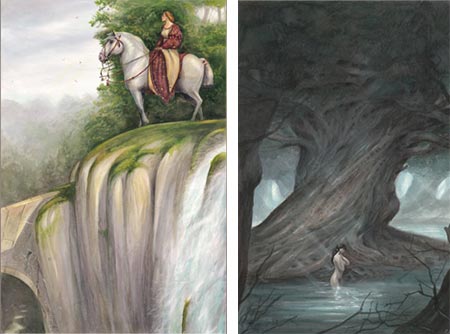
Armel Gaulme is a French illustrator and graphic designer living in Paris. The bio on his site is very brief, but emphasizes that his love for painting and illustration, and the study of artists whose work he admires, has carried him farther than his formal academic training, though he continues to pursue courses at the Ateliers des Beaux-Arts and the Duperré School.There is no client list on his site, but the names of books that he has illustrated and collections (albums) of his work are included under the images. Unfortunately, they don’t seem to be directly available in the U.S. but you can see a selection on Amazon.fr.
Gaulme leans toward fantasy and historical subjects, with a nice emphasis on medieval knights, castles and the Arthurian legends. There is also a book, apparently new, showcased on his site, called Créatures: Insolites & Stupéfiantes (Strange and Amazing Creatures), an imaginary bestiary accumulated during the travels of a fictional adventurer. (I can’t give you direct links within his site because it’s in a single Flash file.)
When looking though his online galleries, be aware of their multi tiered nature so you don’t inadvertently miss things. Within the categories and sub categories at the top of the page, there are third-level tabs at the left of the image space, and the rows of thumbnails have “Prev” and “Next” buttons to additional screens. Also there is a bio and list of links tucked away in the “Contact” section. Interestingly, the text portions of his site are in English.
Gaulme has a nicely imaginative approach, in a variety and sometimes mixture of media. Occasionally his pieces are accompanied by preliminary sketches. There are also sketches and drawings in their own sections. Though many of them are quick suggestions and gesture drawings, some are carried to a high degree of finish as works in themselves.
Gaulme is still fairly young, and I think we’ll be seeing more from this talented illustrator in the future, hopefully on both sides of the Atlantic.
[Suggestion courtesy of Cecile]
Categories:
-
Brigid Marlin

Visionary artist Brigid Marlin was born in Washington, D.C., studied in Dublin, Paris and New York, and now lives and works in London, England. She eventually travelled to Vienna, specifically to learn the Mische Technique, a painstaking Renaissance painting method in which an ink drawing and detailed egg tempera painting form a basis on which layers of oil glazes are built into the final image.The particulars of this old master technique, once thought lost, were revived by visionary artist Ernst Fuchs. (See my recent posts on Robert Venosa and Martina Hoffmann.) Marlin has a step-by-step demonstration of the technique on her site.
The galleries on Marlin’s web site vary from straightforward portraits, painted in the Mische Technique, to Visionary Paintings to Fantasy Portraits, where the two approaches collide.
Even her straightforward portraits can’t help but have a touch of atmosphere that has drifted in from the other worlds that Marlin frequents, infusing them with a touch of secret strangeness, as in this beautiful portrait, Girl in Bluebell Wood.
Marlin has painted portraits of several notable individuals. She was chosen as the first artist to paint an official portrait of the Dalai Lama, for which there is a fascinating story accompanying the images of the painting on her site. Her portrait of J.G. Ballard, an admiring quote from whom forms the introduction to Marlin’s site, hangs in the National Portrait Gallery in London.
Unfortunately, Marlin’s own site may not be the best representation of her work. While there is a variety of her images, they are reproduced too small to get a good feeling for the detail and textural qualities of her work. (Though it’s worth noting that when in the gallery for Visionary Paintings, it’s easy to miss the text links at the top to galleries for two additional series of paintings.) There is a page of available giclee prints as well as a listing of available books.
I’ve listed below some other places on the web that you can see Marlin’s work. The largest reproductions I’ve found are on the Surrealism Now! site.
Brigid Marlin is also the founder of the Society for Art of the Imagination, the web site for which contains an extensive array of galleries of works by the society’s members, including a gallery Marlin’s work.
Though can see the bloodline of her visionary paintings reaching back through surrealist painters like Dali and Magritte (and perhaps even to Giorgio di Chirico), she becomes most intriguing for me when you can see her affection for Renaissance masters like Botticelli and the influence of underappreciated Surrealist greats like Paul Delvaux.
Categories:
-
Bogota Painter William K. Moore

William K. Moore appears to live with a foot, and brush, in two worlds. Originally from Los Angeles, he has spent many years living in Bogota, Columbia and chronicling both cities in photographs and paintings.His primary blog, Bogota Painter William K. Moore, is set up as a “painting a day” blog. In it he concentrates on paintings of the people living in the center of Bogota. He has a particular affection for those on whom financial fortune has not smiled, but who manage to find their way through life with a strength of character that Moore attempts to capture in paint.
Moore works in a variety of media, occasionally oil and acrylic, but most often watercolor and gouache. Occasionally he will list an interesting media mix like “watercolor and grime”. The area of the city he captures most often is an industrial section that provides lots of rough and gritty buildings and objects as backgrounds for his portraits.
He briefly gives the story of his interaction with his subjects, how he often works out some kind of payment in exchange for permission to photograph them, and sometimes describes their circumstances, creating in the process a visual and verbal picture of a city unknown to most Americans.
He also mixes in paintings of his native Los Angeles, which provide an interesting contrast to life in Bogota.
There is a gallery of Moore’s work assembled on the Daily Painters Gallery. He also maintains a Spanish language blog presence in Bogota, Bogotá según William Moore, and a blog of Bogota Documentary Photos.
Categories:




Charley’s Picks
Bookshop.org
(Bookshop.org affilliate links; sales benefit independent bookshop owners; I get a small percentage to help support my work on Lines and Colors)

John Singer Sargent: Watercolors


Urban Sketching: Understanding Perspective


Charley’s Picks
Amazon
(Amazon.com affiliate links; sales go to a larger yacht for Jeff Bezos; but I get a small percentage to help support my work on Lines and Colors)
John Singer Sargent: Watercolors
Urban Sketching: Understanding Perspective