


Categories
- 3d CGI
- Amusements
- Animation
- Anime & Manga
- Art Materials
- Art Videos
- Blogroll
- Cartoons
- Color
- Comics
- Concept & Visual Dev.
- Creativity
- Digital Art
- Digital Painting
- Displaying Art on the Web
- Drawing
- Eye Candy for Today
- Gallery and Museum Art
- High-res Art Images
- Illustration
- Motion Graphics & Flash
- Museums
- Online Museums
- Outsider Art
- Painting
- Painting a Day
- Paleo Art
- Pastel, Conté & Chalk
- Pen & Ink
- Prints and Printmaking
- Reviews
- Sc-fi and Fantasy
- Sculpture & Dimensional
- Site Comments
- Sketching
- Storyboards
- Tools and Techniques
- Uncategorized
- Vector Art
- Videos & Podcasts
- Vision and Optics
- Watercolor and Gouache
- Webcomics
Archives
- May 2026
- April 2026
- March 2026
- February 2026
- January 2026
- December 2025
- November 2025
- October 2025
- September 2025
- August 2025
- July 2025
- June 2025
- May 2025
- January 2025
- December 2024
- November 2024
- October 2024
- September 2024
- August 2024
- June 2024
- April 2024
- March 2024
- February 2024
- January 2024
- December 2023
- November 2023
- October 2023
- September 2023
- August 2023
- July 2023
- May 2023
- April 2023
- March 2023
- February 2023
- January 2023
- December 2022
- November 2022
- September 2022
- August 2022
- July 2022
- June 2022
- May 2022
- April 2022
- March 2022
- February 2022
- January 2022
- December 2021
- November 2021
- October 2021
- September 2021
- August 2021
- July 2021
- June 2021
- May 2021
- April 2021
- March 2021
- February 2021
- January 2021
- December 2020
- November 2020
- October 2020
- September 2020
- August 2020
- July 2020
- June 2020
- May 2020
- April 2020
- March 2020
- February 2020
- January 2020
- December 2019
- November 2019
- October 2019
- September 2019
- August 2019
- July 2019
- June 2019
- May 2019
- April 2019
- March 2019
- February 2019
- January 2019
- December 2018
- November 2018
- October 2018
- September 2018
- August 2018
- July 2018
- June 2018
- May 2018
- April 2018
- March 2018
- February 2018
- January 2018
- December 2017
- November 2017
- October 2017
- September 2017
- August 2017
- July 2017
- June 2017
- May 2017
- April 2017
- March 2017
- February 2017
- January 2017
- December 2016
- November 2016
- October 2016
- September 2016
- August 2016
- July 2016
- June 2016
- May 2016
- April 2016
- March 2016
- February 2016
- January 2016
- December 2015
- November 2015
- October 2015
- September 2015
- August 2015
- July 2015
- June 2015
- May 2015
- April 2015
- March 2015
- February 2015
- January 2015
- December 2014
- November 2014
- October 2014
- September 2014
- August 2014
- July 2014
- June 2014
- May 2014
- April 2014
- March 2014
- February 2014
- January 2014
- December 2013
- November 2013
- October 2013
- September 2013
- August 2013
- July 2013
- June 2013
- May 2013
- April 2013
- March 2013
- February 2013
- January 2013
- December 2012
- November 2012
- October 2012
- September 2012
- August 2012
- July 2012
- June 2012
- May 2012
- April 2012
- March 2012
- February 2012
- January 2012
- December 2011
- November 2011
- October 2011
- September 2011
- August 2011
- July 2011
- June 2011
- May 2011
- April 2011
- March 2011
- February 2011
- January 2011
- December 2010
- November 2010
- October 2010
- September 2010
- August 2010
- July 2010
- June 2010
- May 2010
- April 2010
- March 2010
- February 2010
- January 2010
- December 2009
- November 2009
- October 2009
- September 2009
- August 2009
- July 2009
- June 2009
- May 2009
- April 2009
- March 2009
- February 2009
- January 2009
- December 2008
- November 2008
- October 2008
- September 2008
- August 2008
- July 2008
- June 2008
- May 2008
- April 2008
- March 2008
- February 2008
- January 2008
- December 2007
- November 2007
- October 2007
- September 2007
- August 2007
- July 2007
- June 2007
- May 2007
- April 2007
- March 2007
- February 2007
- January 2007
- December 2006
- November 2006
- October 2006
- September 2006
- August 2006
- July 2006
- June 2006
- May 2006
- April 2006
- March 2006
- February 2006
- January 2006
- December 2005
- November 2005
- October 2005
- September 2005
- August 2005
Relevant Blogs
Art, Painting & Sketch
- Gurney Journey
- Underpaintings
- Art and Influence
- Painting Perceptions
- Oil Painters of America
- Vasari Paint POV
- Flying Fox
- Urban Sketchers
- Bento (Smithsonian)
- Art Inconnu
- The Hidden Place
- Still Life
- Making a Mark
- The Art of the Landscape
- Exploring Color & Creativity
- Art Contrarian
- Artist A Day
- beinArt Surreal Art Collective
- Eye Level
- David Dunlop
- p.i.g.m.e.n.t.i.u.m
- CultureGrrl
- Joaquín Sorolla blog
- Artists in Pastel
“Painting a Day”
- A Painting a Day (Keiser)
- On Painting (Keiser)
- Julian Merrow-Smith
- Karen Jurick
- Jeffrey Hayes
- Carol Marine
- Abbey Ryan
- Daily Paintworks
Other Painting Blogs
- Virtual Gouache Land
- Neil Hollingsworth
- Marc Hanson
- Kevin Menck
- Marc Dalessio
- Larry Seiler
- Stapleton Kearns
- Colin Page
- Roos Schuring
- Hans Versfelt
- Titus Meeuws
- Régis Pettinari
- René Plein Air
- Belinda Del Pesco
- Robin Weiss
- Nathan Fowkes (Land Sketch)
- William Wray
- Frank Serrano
- Stephen Magsig
- Michael Chesley Johnson
- Twice a Week
- Sarah Wimperis
- Rob Adams
- Michael Cole Manley
- The Dirty Palette Club
- Mike Manley’s Draw!
Gallery Art & Illustration mix
Illustration
- Howard Pyle
- 100 Years of Illustration
- BibliOdyssey
- Illustration Art
- Today’s Inspiration
- Illustration Mundo
- Little Chimp Society
- Danny Gregory
- R D (John Martz
- Illustration Friday blog
- Monster Brains
- Illustrators & Illustrations (RU)
- Elwood H. Smith
- DaniDraws.com
- Designers Who Blog
- iSpot Blog
Sci-Fi & Fantasy
Illustration & Comics
Comics & Cartoons
- Comics Beat
- Robot 6
- Newsarama Blog
- Comic Vine
- Comics Alliance
- Forbidden Planet Int.
- Paolo Rivera
- Bolt City
- Flight
- Scott McCloud
- The Comics Journal
- Comixpedia
- Funnybook Babylon
- James Baker
- Middleton’s Sketchbook
- Boneville
- The Hotel Fred
- Paul Rivoche
- Daily Cartoonist
- Mad About Cartoons (William Wray)
- Digital Strips
Illustration & Concept
Animation & Concept
- Cartoon Brew
- Animation Blog
- Cold Hard Flash
- Concept Art World
- The CAB
- FY Concept Art
- Concept Ships
- Concept Robots
- John Nevarez
- Armand Serrano
- Marcos Mateu-Mestre
- all kinds of stuff (Kricfalusi)
- Yacin the faun (Man Arenas)
- Kelsey Mann
- Cre8tivemarks Blog
- Ice-Cream Monster Toon Cafe
- AAU Character & Creature Design
- AAU Animation Notes
- Articles and Texticles
Paleo & Scientific
Tools & Techniques
Other
Lists of Art Blogs
Art Image Resource Links
Historic Art Images
- Wikimedia Commons: Paintings
- Wikimedia Commons: Drawings
- The Athenaeum
- WikiArt (WikiPaintings)
- Google Art Project: Artists
- Google Art Project: Collections (Museums)
- ArtCyclopedia
- Web Gallery of Art
- Art Renewal Center
- Web Gallery of Impressionism
Auction Consolidation sites
Auction sites
- Sotheby’s
- Bonham’s
- Christies
- Heritage Auctions: Fine Art
- Heritage Auctions: Illustration
- Freeman’s Auctions
- Bukowskis
- Shannon’s
Image Search
Reverse Image Search (search by image)
- Tin Eye
- RevImg
- Google Image Search (camera icon)
- Bing Image Search (camera icon)
Promoting some friends and some clients of my website design business
- Twin Willows T’ai Chi studio in Wilmington DE. Taiji classes with Bryan Davis.
- Ray Hayward, Inspired Teacher of T’ai Chi ( Taiji ) in Minneapolis, Founder of Mindful Motion Tai Chi Academy
- OldHead Tattoo studio and Art Gallery in Wilmington DE. Tattoos and paintings by Bruce Gulick
- Sharon Domenico Art, pet portrait oil paintings
- Platinum Paperhanging, wallpaper hanging, Main Line and Philadelphia, PA
- Lisa Stone Design, interior designer, Main Line and Philadelphia, PA
- Studio12KPT, original art, prints, calendars and other custom printed items by Van Sickle & Rolleri
-
Finding a web hosting provider

How to Display Your Art on the Web: Part 1
[This is part of a series of articles for which the introduction and list of articles is here. If you haven’t read the introduction yet, it would be helpful to read it first.]
In a way the subject of the next article (registering a domain name) is more immediate, in that you want to do that as soon as possible, even if you’re not ready to put up a site. Domain names tend to get snapped up when you’re not looking.
However, even though web site hosting and domain name registration are two different things, they are often handled through the same companies, and it can be slightly easier to take adgvantage of that (not necessary, just a little easier).
Finding a web site hosting company takes a little work. I will not go out on a limb and directly recommend web hosting companies to you, because they all have their plusses and minuses, and some of you will inevitably come back crying to me that I recommended so-and-so to you and now you’re unhappy and it’s all my fault.
Look on sites like c/net for reviews of hosting providers. Be a little wary of sites devoted entirely to reviewing and listing the “best” web hosts. Many of them are legit, but some are shills for particular companies. At the very least, compare the opinions of several review sites. Ask friends, business associates and well-dressed strangers in the street about their experiences with their web hosting provider (assuming they even know who it is). You may at least find some to avoid.
There are hosting services who bill themselves as particularly Mac-friendly (though most UNIX-based hosting is OS agnostic) and there are even some hosts who aim their services specifically at illustrators and other creatives, like GiMUR.net (run by the founder of LCSV4), DogBark.com, Laughing Squid and Huevia, though I don’t have direct experience with any of them.
There are also portal sites for gallery artists that offer site hosting as a benefit of membership; and illustration directories that offer a gallery space as part of your listing with the directory, though these are likely to be more limited than regular web site hosting, and can cost as much or more, in exchange for the service of inclusion in their directory.
“Free hosting” – Avoid any so-called “free” hosting that forces your site to display ads, banners, pop-ups or other forms of onerous limitations in exchange for the “free” service. It’s unseemly, unprofessional and will do your reputation as an artist more harm than good.
Blogs as free web sites – If you are absolutely so poor that you can’t afford $8 a month, consider that many national level blogging sites offer blog accounts for free, without forcing advertising (at least for now). If the blogging account allows the use of “pages” instead of “posts” (as WordPress.com does, for example), you can create a functional web site for free. It’s more restrictive than regular web hosting, and the URL is likely to be something like yourname.blogger.com instead of yourname.com, but it may do. Also, the blogging services offer default or third-party custom templates that make for a variety of free designs, even if you share them with other sites.
Cost – National level web site hosting providers offer basic “shared” web hosting (which simply means you share a web server with other sites, the normal arrangement) for $10-$15 a month or less, if paid for by the year, sometimes with a modest ($15 or so) “setup fee”. You can also arrange to pay for most plans by the month or quarterly, at a slightly higher cost; which may be worthwhile if you are unsure about the host. You can always opt for yearly payments later.
Basic “shared hosting” if fine. You don’t need anything fancy, and you probably don’t need a business account to start. Given a choice between “Windows Hosting” and “Linux or Unix Hosting” (meaning the type of operating system on the server where your site site hosted) I choose Linux or Unix, as it is often cheaper, I believe it to be more reliable and flexible (a personal bias) and the only advantage I see to Windows Hosting is that it enables the use of Microsoft Front Page, which I will strongly advise you against.
Extras – See if the options from the basic plan from one company appeal to you more than another. Do you want a blog as well as a web site? Do you want a discussion board? Do they offer the ability to host additional domains without charge (in case you want to have yourname.com and yournameillustration.com point to the same site)? Take a look at the sample stats page, that shows your site’s statistics for number of visitors, etc., when comparing different hosting companies. What is the storage and bandwidth allotment? Most national level hosting plans offer more than enough, but if you plan to feature tons of huge image files, more may be better.
Control Panels – Most hosting plans include some kind of “Control Panel” that allows you to add and administer e-mail accounts, set up FTP access, password-protect directories, add features like blogs and discussion boards and so on. This is one area where hosting providers vary widely, so take a look at their Control Panel samples when comparing hosting providers.
Add-ons – You only need basic hosting. Many hosting providers (most, in fact) will confuse the issue by trying to get you to sign up for all kinds of bells and whistles at extra cost throughout the sign-up process. You don’t need them! Check for the services included in the basic package when comparing different providers, but don’t order fancy add-ons. You can always add them later if you really want to. Even eCommerce and shopping carts aren’t necessary at this stage. It’s actually easier to sell through PayPal initially. You can add a shopping cart later if you really need one. (However, you may want to compare eCommerce offerings when comparing providers.)
Templates and “site builders” – These have the appeal of promising to allow you to build a site with no web design or HTML knowledge. I don’t want to turn your off to them out of hand; perhaps there are good ones out there, but my experience with these things is that they are limited and inflexible, and enough of a pain to learn to deal with that the same learning curve would give you a basic working knowledge of HTML, something you can apply anywhere, not just to one proprietary template system.
Dynamic template systems offered by hosting providers are different than static HTML templates, which are just pre-made page designs. I’ll talk about those in a future section on design.
Your hosting info – When you arrange for your web hosting, they will normally send you an email with the detais of how you set up FTP access to your site, use the “Control Panel” and set up email accounts. Immediately print out a copy of this email and file it. Send a copy of it to yourself and keep both coipes in your email records. Send a copy of it to your fastidious Aunt Mille and ask her to keep it on file fo you.
I can’t tell you how many times I’ve asked new clients about FTP access to their site pages and had them say “Oh, I know I got that, but I don’t know what I did with it. Do I need it?” You can always call up the provider and ask them to send you the info again. I just want to impress on you that the info in it, notably logins and passwords, is stuff you (or your web site designer, if you go that route) will need.
Registering your domain at the same time – As I mentioned at the beginning of this article, it can be slightly easier to register your domain name through your hosting provider, than to register it separately, and the sign-up process will ask you if you want to register a domain at that point, or if you already have a domain registered elsewhere which you want to assign to the new hosting account. I’ll go into domain names in more detail in the next post in this series.
Categories:
-
Robert Venosa

When I first saw Robert Venosa’s work reproduced on the web, I wondered if it was done digitally. Though he has recently begun to work in digital media, most of his paintings are in tempera and oil on board, utilizing the “Misch Technique” of Hubert and Jan Van Eyck that he was introduced to when studying with Mati Klarwein and Ernst Fuchs.This technique begins with a bright tempera underpainting over which is laid a series of thin oil glazes that allow light to pass through several layers of translucent color and bounce off the underpainting and returning through the layers before returning to the eye. This is something that you find in many old master paintings that does not reveal itself in photographs.
The technique seems perfectly suited to Venosa’s subject matter.
His images are striking arrangements of rounded, translucent, vaguely organic forms that morph and blend into one another like melting liquid crystal. These are sometimes arranged as “landscapes”, sometimes as fields of dimensional forms and other times as objects, occasionally suggestive of faces, as in his painting titled “Hallucinatory Self Portrait”.
Sometimes his objects can have deliberately plant-like forms, at other times they are blocklike, filled with striations and crinolations that give suggestions of rounded rock formations, the intersection of microscopic cells or flows of solidified air currents.
Venosa’s paintings have ancestors in the Surrealist “landscapes” and polymorphous objects of Yves Tanguy and the wonderful decalcomania inspired visions of Max Ernst. You can also see the influence of Salvador Dali, with whom Venosa became acquainted when he moved to Spain. It was reportedly Venosa who introduced H.R. Giger to Dali.
I also see a similarity in Venosa’s work to certain work by Jean “Mobius” Giraud, though there it’s difficult to tell which way the influence flows. Venosa has also done some collaborative work with digital artist Stephen Miller of Mkzdk.
Venosa has applied his visionary images to concept art for movies like Dune and Fire in the Sky, and the upcoming IMAX film, Race for Atlantis.
Unfortunately, as is often the case, the images on Venosa’s web site are too small to get a good feeling for the work. You can find somewhat larger ones on The Society for Art of the Imagination, this unofficial gallery and the beinArt Surreal Art Collective.
There is a listing in the beinArt Surreal Art Blog about a solo exhibition of Venosa’s work at the Feneiro Gallery in Eugene Oregon from July 6 to August 2nd, 2007.
Addendum: I received a notice that Robert Venosa, and his wife Martina Hoffmann are conducting a series of workshops on Visionary Painting, the latest of which will be held this November 24th to 30th in Boulder, Colorado.
Addendum II: A new new collcetion of Venosa’s work, Robert Venosa: Illuminatus (Amazon link) has just been published. You can read more details on his site.
Categories:
-
William B. Hoyt (update)
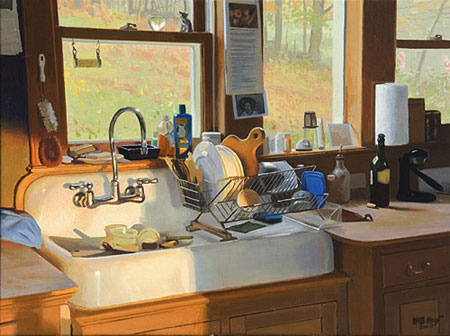
I was looking through the website of the Maine Art Gallery (in Kennebunkport), when I was struck by this image. On looking up the artist’s website, I realized I had written a brief post about him a couple of years ago.William B. Hoyt’s clear, precise, realistic approach is most often applied to landscapes and seascapes. In the latter you can see the influence of realist giants like Thomas Eakins, a point he makes clear by including a pinned-up print of Eakins’ Max Schmitt in a single scull over the sink in one of his combination interior/landscape paintings, Flat Water.
Likewise, he has painted a small print of Vermeer’s The Milkmaid into a painting of his kitchen he has titled King Arthur and the Milkmaid (the King Arthur reference is to the brand of the bag of flour), Andrew Wyeth’s Christina’s World in his Lobsters and Champagne; and has Caravaggio’s Baccus tucked in the window in Kitchen in Tuscany.
There are other references to influences tucked into the interiors in his new work at the Maine Art Gallery. Unfortunately, the images posted there are too lo-res to see in detail.
In fact, it is Hoyt’s interiors that I find most interesting. Though his landscapes have an obvious appeal and are the major focus of his work, the interiors have a stillness and “moment in time” quality that are wonderfully evocative, and I was glad to see that his new works include a number of interiors. The large windows in his kitchen, in particular, invite his repeated theme of interior/landscape combinations, and the porcelain and unpainted wood make for a rich setting to tie the objects together.
Hoyt doesn’t shy away from complex compositions and seems to challenge himself in his interior paintings with numerous objects that vary in color, texture, degree of sheen and sensitivity to reflected light and color. His landscapes are often panoramic in proportion and complex in subject matter.
Hoyt has revised his website since I last visited, but I’m a little disappointed that the new one still doesn’t show his work to best advantage. Instead of elegantly introducing you to the artist and his work, and quietly letting you know that there are prints available, the site starts right in trying hard to sell the Giclées, giving it an air of commercialism. You almost feel that the primary focus of the paintings is to sell the prints. I’m sure this isn’t the case, but it’s an unfortunate effect of the emphasis on the prints rather than on the paintings.
It’s also still way too easy to miss the link at the bottom right of the image pages that brings up the “high-res version”, without which you wouldn’t be able get a much feeling for subtlety and strength of his work.
Categories:
-
Drew Struzan

Drew Struzan is another of those artists, like Michael Deas, whose work you have undoubtedly seen, whether you realize it or not. Struzan is responsible for some of the most famous and recognizable movie posters in recent memory. He has also done art for advertising, book and comic covers, music CD covers and other product illustration.Struzan is best known for his movie posters. He has obviously absorbed influences from illustration greats like J.C. Leyendecker, Coles Phillips, Norman Rockwell and others, and brings his knowledge of illustration techniques to bear in clear, powerful and striking representation of the likenesses of actors and the succinct representation of the promised excitement in a movie.
In his online portfolio you can see some of the famous poster and advertising art he has created for Star Wars, Indiana Jones, Harry Potter, Blade Runner, Back to the Future, Pan’s Labyrinth, Hellboy and others.
Struzan works in airbrushed acrylics on board with details and textures added in colored pencil. There is a drawings section in his portfolio in which you can see some freely realized, but remarkably precise, drawing in colored pencil on toned paper.
The portfolio is arranged so that the initial click gives you a brief description and a detail image, which is linked to the full size images. the detail images occasionally give a hint at the wonderful surface and texture characteristics of his work and make you wish they were reproduced larger.
Fortunately, there are three (as far as I know) collections of his work: The Movie Posters Of Drew Struzan, The Art of Drew Struzan – Star Wars Portfolio and Drew Struzan: Oeuvre.
[Link courtesy of Michael Hirsh of Articles and Texticles]
Categories:
-
Peter Sylvada

California painter and illustrator Peter Sylvada paints in a way that makes “painterly” too weak a descriptor.Ranging from muted earth tones to brilliant, impressionist strength colors, his oil paintings are composed of wonderfully bold chunks of color and a wealth of tactile brush texture.
From portraits that show the obvious influence of Sargent, to Homer-inspired sea images, to city images that carry echoes of Robert Henri, Sylvada draws on a wealth of affection for great artists and imbues his paintings with rich contrasts of color and tone. His compositions experiment with unorthodox variations in proportion and balance in which backgrounds and occasionally parts of objects are turned into color fields shimmering with the textures of brush strokes.
Unfortunately, his portfolio site, though nicely designed graphically, is hampered by agonizingly slow image transitions that make it an exercise in patience to go through more than a few images. It’s worth the trouble, though; perseverance will be rewarded by an array of wonderful paintings.
Similarly frustrating is his “Bio” page, which also keeps you waiting for over-long “page” turns, and then brushes off his professional accomplishments as though they were inconsequential.
His illustration clients include Toyota, Nissan, United Airlines, The Atlantic Monthly, The Philadelphia Inquirer, and others.
Sylvada is working on a children’s book he has written and he is currently preparing for his initial gallery exhibition.
Categories:
-
Jacques-Louis David on
The Power of Art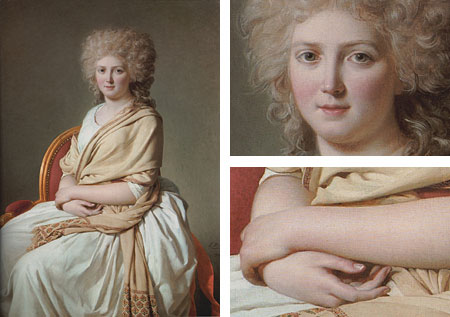
The subject of Simon Schama’s The Power of Art, the BBC/PBS program being broadcast on most PBS stations tonight in the US, is French neo-classical painter Jacques-Louis David.It’s difficult to separate David’s life and work from the political turmoil of his times, in which he was intricately involved; as I pointed out in my previous post about David, and as I’m sure Schama will go into in detail in the program.
It might be nice, however, to simply stop and look at David as a painter, seeing him directly as in this Portrait of Anne-Marie-Louise Thélusson, Comtesse de Sorcy, a larger version of which can be seen on the Art Renewal site.
As I pointed out in the post I wrote just before my post on David, a painting that I though for years was my favorite painting by David (and one of my favorite paintings in the Metropolitan Museum of Art, which is saying something) turned out not to be by David, but by Marie-Denise Villers, a student of one of his students.
Perhaps Schama will have some surprises up his sleeve in his look as David as well.
Categories:




Charley’s Picks
Bookshop.org
(Bookshop.org affilliate links; sales benefit independent bookshop owners; I get a small percentage to help support my work on Lines and Colors)

John Singer Sargent: Watercolors


Urban Sketching: Understanding Perspective


Charley’s Picks
Amazon
(Amazon.com affiliate links; sales go to a larger yacht for Jeff Bezos; but I get a small percentage to help support my work on Lines and Colors)
John Singer Sargent: Watercolors
Urban Sketching: Understanding Perspective