


Categories
- 3d CGI
- Amusements
- Animation
- Anime & Manga
- Art Materials
- Art Videos
- Blogroll
- Cartoons
- Color
- Comics
- Concept & Visual Dev.
- Creativity
- Digital Art
- Digital Painting
- Displaying Art on the Web
- Drawing
- Eye Candy for Today
- Gallery and Museum Art
- High-res Art Images
- Illustration
- Motion Graphics & Flash
- Museums
- Online Museums
- Outsider Art
- Painting
- Painting a Day
- Paleo Art
- Pastel, Conté & Chalk
- Pen & Ink
- Prints and Printmaking
- Reviews
- Sc-fi and Fantasy
- Sculpture & Dimensional
- Site Comments
- Sketching
- Storyboards
- Tools and Techniques
- Uncategorized
- Vector Art
- Videos & Podcasts
- Vision and Optics
- Watercolor and Gouache
- Webcomics
Archives
- April 2026
- March 2026
- February 2026
- January 2026
- December 2025
- November 2025
- October 2025
- September 2025
- August 2025
- July 2025
- June 2025
- May 2025
- January 2025
- December 2024
- November 2024
- October 2024
- September 2024
- August 2024
- June 2024
- April 2024
- March 2024
- February 2024
- January 2024
- December 2023
- November 2023
- October 2023
- September 2023
- August 2023
- July 2023
- May 2023
- April 2023
- March 2023
- February 2023
- January 2023
- December 2022
- November 2022
- September 2022
- August 2022
- July 2022
- June 2022
- May 2022
- April 2022
- March 2022
- February 2022
- January 2022
- December 2021
- November 2021
- October 2021
- September 2021
- August 2021
- July 2021
- June 2021
- May 2021
- April 2021
- March 2021
- February 2021
- January 2021
- December 2020
- November 2020
- October 2020
- September 2020
- August 2020
- July 2020
- June 2020
- May 2020
- April 2020
- March 2020
- February 2020
- January 2020
- December 2019
- November 2019
- October 2019
- September 2019
- August 2019
- July 2019
- June 2019
- May 2019
- April 2019
- March 2019
- February 2019
- January 2019
- December 2018
- November 2018
- October 2018
- September 2018
- August 2018
- July 2018
- June 2018
- May 2018
- April 2018
- March 2018
- February 2018
- January 2018
- December 2017
- November 2017
- October 2017
- September 2017
- August 2017
- July 2017
- June 2017
- May 2017
- April 2017
- March 2017
- February 2017
- January 2017
- December 2016
- November 2016
- October 2016
- September 2016
- August 2016
- July 2016
- June 2016
- May 2016
- April 2016
- March 2016
- February 2016
- January 2016
- December 2015
- November 2015
- October 2015
- September 2015
- August 2015
- July 2015
- June 2015
- May 2015
- April 2015
- March 2015
- February 2015
- January 2015
- December 2014
- November 2014
- October 2014
- September 2014
- August 2014
- July 2014
- June 2014
- May 2014
- April 2014
- March 2014
- February 2014
- January 2014
- December 2013
- November 2013
- October 2013
- September 2013
- August 2013
- July 2013
- June 2013
- May 2013
- April 2013
- March 2013
- February 2013
- January 2013
- December 2012
- November 2012
- October 2012
- September 2012
- August 2012
- July 2012
- June 2012
- May 2012
- April 2012
- March 2012
- February 2012
- January 2012
- December 2011
- November 2011
- October 2011
- September 2011
- August 2011
- July 2011
- June 2011
- May 2011
- April 2011
- March 2011
- February 2011
- January 2011
- December 2010
- November 2010
- October 2010
- September 2010
- August 2010
- July 2010
- June 2010
- May 2010
- April 2010
- March 2010
- February 2010
- January 2010
- December 2009
- November 2009
- October 2009
- September 2009
- August 2009
- July 2009
- June 2009
- May 2009
- April 2009
- March 2009
- February 2009
- January 2009
- December 2008
- November 2008
- October 2008
- September 2008
- August 2008
- July 2008
- June 2008
- May 2008
- April 2008
- March 2008
- February 2008
- January 2008
- December 2007
- November 2007
- October 2007
- September 2007
- August 2007
- July 2007
- June 2007
- May 2007
- April 2007
- March 2007
- February 2007
- January 2007
- December 2006
- November 2006
- October 2006
- September 2006
- August 2006
- July 2006
- June 2006
- May 2006
- April 2006
- March 2006
- February 2006
- January 2006
- December 2005
- November 2005
- October 2005
- September 2005
- August 2005
Relevant Blogs
Art, Painting & Sketch
- Gurney Journey
- Underpaintings
- Art and Influence
- Painting Perceptions
- Oil Painters of America
- Vasari Paint POV
- Flying Fox
- Urban Sketchers
- Bento (Smithsonian)
- Art Inconnu
- The Hidden Place
- Still Life
- Making a Mark
- The Art of the Landscape
- Exploring Color & Creativity
- Art Contrarian
- Artist A Day
- beinArt Surreal Art Collective
- Eye Level
- David Dunlop
- p.i.g.m.e.n.t.i.u.m
- CultureGrrl
- Joaquín Sorolla blog
- Artists in Pastel
“Painting a Day”
- A Painting a Day (Keiser)
- On Painting (Keiser)
- Julian Merrow-Smith
- Karen Jurick
- Jeffrey Hayes
- Carol Marine
- Abbey Ryan
- Daily Paintworks
Other Painting Blogs
- Virtual Gouache Land
- Neil Hollingsworth
- Marc Hanson
- Kevin Menck
- Marc Dalessio
- Larry Seiler
- Stapleton Kearns
- Colin Page
- Roos Schuring
- Hans Versfelt
- Titus Meeuws
- Régis Pettinari
- René Plein Air
- Belinda Del Pesco
- Robin Weiss
- Nathan Fowkes (Land Sketch)
- William Wray
- Frank Serrano
- Stephen Magsig
- Michael Chesley Johnson
- Twice a Week
- Sarah Wimperis
- Rob Adams
- Michael Cole Manley
- The Dirty Palette Club
- Mike Manley’s Draw!
Gallery Art & Illustration mix
Illustration
- Howard Pyle
- 100 Years of Illustration
- BibliOdyssey
- Illustration Art
- Today’s Inspiration
- Illustration Mundo
- Little Chimp Society
- Danny Gregory
- R D (John Martz
- Illustration Friday blog
- Monster Brains
- Illustrators & Illustrations (RU)
- Elwood H. Smith
- DaniDraws.com
- Designers Who Blog
- iSpot Blog
Sci-Fi & Fantasy
Illustration & Comics
Comics & Cartoons
- Comics Beat
- Robot 6
- Newsarama Blog
- Comic Vine
- Comics Alliance
- Forbidden Planet Int.
- Paolo Rivera
- Bolt City
- Flight
- Scott McCloud
- The Comics Journal
- Comixpedia
- Funnybook Babylon
- James Baker
- Middleton’s Sketchbook
- Boneville
- The Hotel Fred
- Paul Rivoche
- Daily Cartoonist
- Mad About Cartoons (William Wray)
- Digital Strips
Illustration & Concept
Animation & Concept
- Cartoon Brew
- Animation Blog
- Cold Hard Flash
- Concept Art World
- The CAB
- FY Concept Art
- Concept Ships
- Concept Robots
- John Nevarez
- Armand Serrano
- Marcos Mateu-Mestre
- all kinds of stuff (Kricfalusi)
- Yacin the faun (Man Arenas)
- Kelsey Mann
- Cre8tivemarks Blog
- Ice-Cream Monster Toon Cafe
- AAU Character & Creature Design
- AAU Animation Notes
- Articles and Texticles
Paleo & Scientific
Tools & Techniques
Other
Lists of Art Blogs
Art Image Resource Links
Historic Art Images
- Wikimedia Commons: Paintings
- Wikimedia Commons: Drawings
- The Athenaeum
- WikiArt (WikiPaintings)
- Google Art Project: Artists
- Google Art Project: Collections (Museums)
- ArtCyclopedia
- Web Gallery of Art
- Art Renewal Center
- Web Gallery of Impressionism
Auction Consolidation sites
Auction sites
- Sotheby’s
- Bonham’s
- Christies
- Heritage Auctions: Fine Art
- Heritage Auctions: Illustration
- Freeman’s Auctions
- Bukowskis
- Shannon’s
Image Search
Reverse Image Search (search by image)
- Tin Eye
- RevImg
- Google Image Search (camera icon)
- Bing Image Search (camera icon)
Promoting some friends and some clients of my website design business
- Twin Willows T’ai Chi studio in Wilmington DE. Taiji classes with Bryan Davis.
- Ray Hayward, Inspired Teacher of T’ai Chi ( Taiji ) in Minneapolis, Founder of Mindful Motion Tai Chi Academy
- OldHead Tattoo studio and Art Gallery in Wilmington DE. Tattoos and paintings by Bruce Gulick
- Sharon Domenico Art, pet portrait oil paintings
- Platinum Paperhanging, wallpaper hanging, Main Line and Philadelphia, PA
- Lisa Stone Design, interior designer, Main Line and Philadelphia, PA
- Studio12KPT, original art, prints, calendars and other custom printed items by Van Sickle & Rolleri
-
Edmond Aman-Jean
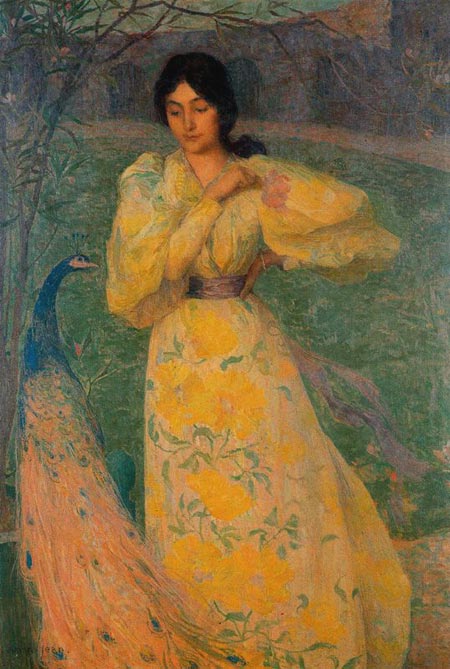
Edmond Aman-Jean was a French Symbolist painter who was friends with Georges Seurat, the famed neo-impressionist (pointillist) painter, and shared a studio with him for a number of years.Aman-Jean and Seurat both studied at the Ecole des Beaux-Arts in Paris with Henri Lehmann, an academic painter whose traditions they both eventually moved away from.
Though he never followed his friend’s forays into fields of painstakingly dabbed broken color, he did experiment with a bright palette and painterly brush handling. His subject matter, often young women, frequently in profile, arrayed in languid, even melancholy, poses, put him more in line with the Pre-Raphaelite painters than the Impressionists or their followers.
Aman-Jean became friends with prominent Symbolist poets and joined in their somewhat darker version of romanticism.
Categories:
-
Allpaintings Art Portal

One of the best things about the internet is its exponential rate of growth. If there’s something you can’t find today, wait a few years (or months, or days) and it just may pop up. “All things”, to paraphrase the zen-like passage from the Bible, “come to he who waits.”When I started writing Lines and Colors back in 2005, my very first post was about the Art Renewal Center, a sprawling art image resource dedicated to representational art. Since then I’ve discovered many other art image portals, like terrific Web Gallery of Art (see my post here), and The Athenaeum, which has recently been one of my favorites; as well as several others that I frequently link to in my posts about well represented artists from the past.
Sites like ARC, the WGA and the Athenaeum are constantly adding to and improving their image catalogs, but occasionally I’ll be surprised to find a new (at least to me) major trove of online art.
A case in point is the Allpaintings Art Portal, which I wasn’t aware of until a few months ago (at allpaintings.org, allpaintings.com is just a squatted domain). Im not certain how long the site has been established, but it boasts over 33,000 images (though some of them contemporary, in a “Users Gallery”), as well as a blog and Art News listing.
The works are arranged in general stylistic categories with oddly varying degrees of specificity, like Baroque, Impressionism, Hudson River School, Barbizon School, Symbolism and Realism, with subsections for individual artists.
The image “thumbnails”, actually quite large, are presented as square crops and alphabetically arranged, oddly enough, by the artists’ given names rather than by surname.
While not “complete” in any sense of the word, or even “as complete” as some of the art image sites that have been established for many years, the site nonetheless contains an impressive number of images, carefully selected and nicely presented; with well balanced color and good quality of reproduction.
The best thing about the Allpaintings Art Portal, though, is the size of the images. While many of the other art portals have very large images for some works, the Allpaintings site seems to be taking pains to post large images whenever possible, some of them are among the highest resolution images of paintings you’ll find in art portal sites.
Once you’ve drilled down through an artist to an individual painting. look for the link above it to “View larger Image” (the image itself at that point is often linked to a detail crop, or a series of them, click on the text link for the full large image).
The selection of images is impressive as well. Though fewer artists may be represented than other portal sites, the selection of images for an individual artist may include images not found in the others, such as one of the best resources for the pre-tonalist work of George Inness (my post here), good selections of American Impressionist Theodore Robinson and undersung French Impressionist Gustav Caillebotte (my post here), a section dedicated the Pre-Raphaelites (my post here) and related painters, including John William Waterhouse (my post here), a wonderful selection of very high resolution detail crops from Caravaggio’s paintings, and probably the best resource anywhere for one of my (undeservedly obscure) favorites, Frits Thaulow (Hooray! — my post here); just to name a few.
(Image above: Caravaggio, Frits Thaulow, Theodore Robinson, George Inness, Gustav Caillebotte, John William Waterhouse)
As usual in this kind of situation, I’ll issue my Major Time Sink Warning. There are enough beautiful images here to keep you avoiding work for weeks on end.
Enjoy.
Categories:
-
Tatsuyuki Tanaka
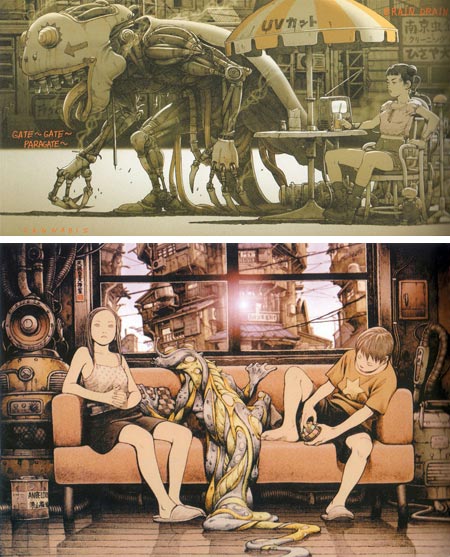
Tatsuyuki Tanaka is a Japanese animator, illustrator and comics artist who was one of the animators on the landmark anime Akira; and has done key animation, storyboarding and concept design for a number of other animated films, including directing sequences for the anthology anime Genius Party Beyond, which also includes a sequence by one of my favorite anime directors, Koji Morimoto.I’m a little shaky on the particulars because so much information is in other languages, but I believe Tanaka is associated with Morimoto’s Studio 4C production company. (There is a page for Tanaka on an unofficial French site devoted to Morimoto and Studio 4C here, Google Translate English here).
There is a new book of Tanaka’s work called Cannabis Works which I think is a combination manga (comic story) and art book. It’s easier to find excerpts of the book online than it is to find copies for sale. Amazon lists it as though it were unavailable in the US, but I did find it on the Anime Books Yahoo Store for $31.00 U.S. (I haven’t ordered from them so I can’t give a recommendation.) His comics also appear in an anthology comic called Boiled Head.
Tanaka draws with a refined style that is almost European, without the excessive stylization often associated with manga and anime. He is also a master of the hyper-complex backgrounds and machinery that often make Japanese comics and animation dazzling eye-candy. Tanaka is feverishly imaginative, like a blend of some of the best characteristics of Katsuhiro Otomo, Masamune Shirow and Jean “Moebius” Giraud.
Tanaka uses a muted, restrained palette to great effect in a number of his images, almost to the point of being monochromatic, creating darkly cinematic moods and otherworldly atmospheres.
Digik Gallery has a gallery of large images from the book, Pink Tentacle has a short, rather trippy sequence here, and I’ve listed some other resources below.
[Via Articles & Texticles and io9]
Categories:
-
Drew Struzan (update)

Drew Struzan is one of the most widely recognized and influential poster artists of modern times. In addition, he is a versatile illustrator of book and comic covers, music LP and CD covers, advertising and other product illustrations.I wrote about Struzan back in 2007. Since then his website has been redone with many additional images and reorganized into multiple sections. It not only showcases his Illustrated Works in various areas, but also provides an online gallery of his Studio Works.
The latter features a selection of paintings and drawings that range from fanciful interpretations of some of the famous faces he has worked with in his illustration, as well as imaginative images of a variety of subjects, including some nicely straightforward landscapes (image above, bottom right, Huntington Gardens, pastel and colored pencils on gray paper.)
I particularly enjoy the way Struzan works in the great tradition of movie posters, in which the stars and several dramatic sequences from the movie are worked into a single composition. It’s a treat to see the wide range of his illustration work and more of his personal and studio work as well.
The online galleries are set up in an interesting reverse of a common paradigm, in that the initial image is a detail crop, clicking on which goes to the full image of the work.
Some of the detail images show his work large enough to see his beautiful technique. In the detail of the image above, a poster for Big Trouble in Little China that I’m particularly fond of, you can see his handling of acryilc and colored pencil; a technique he uses to advantage to combine designerly elements with superb draftsmanship and lively, textural rendering (image above, bottom left).
The only awkward thing about the site is that there is no direct link between the Illustration and Studio sections without returning to the home page.
Gallery Nucleus, a sometime advertiser on Lines and Colors, has managed yet again to make me envious of those in their area (Alhambra California), by mounting a show of Struzan’s work, Drew Struzan: An Artist’s Vision, that runs from February 13 to March 2, 2009. The opening reception is this Friday, February 13 from 7:00 to 11:00PM, and the artist will be there.
In the meanwhile, those of us who are, oh say, 2,700 miles away, will be able to content ourselves with the terrific new site.
Categories:
-
On taking photographs in art museums

Some years ago I found out, much to my surprise and delight, that personal photography was permitted in most major art museums in the US and many in Europe. Museums like the Metropolitan Museum of Art, the Philadelphia Museum of Art, the National Gallery in Washington the the Louvre in Paris all permit you to photograph the artwork in their permanent collections (though not visiting or special exhibits, or works on loan).The ability to take your own photos of artworks is wonderful for a number of reasons; not the least of which is that, if you work at it, you can take photographs with a small, inexpensive camera that show more detail, brush strokes and paint surface characteristics than the images in most art books and other reproductions.
It’s not that professional photographs taken under controlled conditions aren’t better, it’s just that they’re seldom made available at high enough resolution to show the detail. Occasionally an art book will show a few small detail crops, but even that is rare. In your own photographs you can zoom in at will, and take close-up crops the would never make it into an art book. You can also get photographs of wonderful but obscure works that rarely make it into reproduction.
It’s not easy, though. There are rules. Most museums that permit photography prohibit the use of flash or tripods. There is usually a policy statement about photography on the museum’s website in the section about visiting the museum or “museum policies”. (The National Gallery of Art in Washington actually allows flash photography, though they shouldn’t, and the Met permits tripods on certain days.)
Taking a well focused photograph of a painting in low light with a handheld camera can be a challenge, as my numerous blurry attempts attest, but you can do it with a little patience.
The good news is that it’s gotten easier in in the last couple of years, with new advances in camera technology, most importantly the new generation of cameras with Image Stabilization.
This is a group of technologies that reduce the blurring effect of camera shake by physically moving either the lens element or the image sensor in digital cameras to compensate for the movement of the camera body.
Be careful when shopping for this, however, there are a lot of spurious claims of “anti-shake” and “anti-blur” features that refer to simplistic mechanisms that simply use a high ISO (allowing more light to be read by the sensor in less time) that allows them to increase shutter speed; which in small consumer cameras can easily result in pictures that are so grainy and noisy as to be unusable. (This is a phony feature in much the same way that “digital zoom” is a phony feature, as it is essentially just a smaller crop of the original image with less resolution. “Optical zoom” is the real thing.)
Read reviews on camera enthusiast sites to ensure that the camera you’re choosing has actual mechanical image stabilization. The better manufacturers generally make it clear that they’re providing genuine image stabilization (though they often have different names for it).
 Even though I already have a small camera I like very much, a Canon A-95, I recently bought a new camera just for the purpose of taking photos in art museums, both because I wanted image stabilization and because I wanted something a bit smaller and easier to carry around.
After diligently doing my homework (and if you’ve read my article on pochade boxes, for example, you know I can be a bit obsessive about researching what I buy), I decided on a Canon SD770IS Digital Elph (Amazon link, image at left).
In looking for camera that would be best for the purpose, and still relatively inexpensive, I considered several cameras, read numerous reviews and, after leaning toward the Sony Cybershot DSCW150 for awhile (their image stabilization tech is branded “Sony Super Steady Shot”), settled on the Canon.
Both have received excellent reviews and provide the image stabilization feature in a small package (about the size of a deck of playing cards) at a reasonable price. These size cameras are sometimes called “sub-compact” or “shirt pocket cameras”.
Prices on digital cameras are ephemeral, changing by the minute based on retailer, marketing whims, and apparently alignment of the moon and planets. I found good prices on Amazon for the particular camera I was buying, but that even varied within the same model. When I bought my SD770, the Silver version was $160 and the black trim model of the same camera was $190, and at the moment it’s reversed, go figure.
It’s worth looking around even within Amazon or other large suppliers for multiple listings of the same product to see if you can find a better price. The camera review sites often list suppliers and prices at the bottom of reviews, but be wary of some smaller suppliers, look for reviews of the retailer before buying somewhere you haven’t purchased before.
There are a number of other small image stabilized cameras from Nikon, Panasonic and others (who often have different names for the image stabilizing technology) that would also be excellent choices. I don’t mean to limit your choices or suggest I have a definitive answer, I’m just trying to provide the benefit of my experience.
So far I’ve been very pleased. The image stabilization feature allows me to get about 2 f stops of improvement in ability to shoot unblurred images in lower light conditions, the color balance and image sharpness are good and the camera is small enough to carry without being distracted by it when I’m not actively taking pictures. I also got a Canon case for the camera that slips on a belt and has a magnetically closed flap that provides much easier access than a zippered case.
Bear in mind, though, that image stabilization is not a magic cure for blurred shots, just an improvement, an edge. Also, you can certainly take photos in museums with cameras without that feature, as I’ve done many times, it just takes a bit more work.
In either case the old advice still holds, keep your elbows in, breathe out before shooting and, perhaps most importantly, take multiple shots. Get a large memory card for your digital camera so you’re not intimidated about using memory space, they’re inexpensive now, and take several shots of everything. That’s perhaps the single most useful rule I’ve learned about photography, and one of the best things about digital photos, you can just throw out the files you don’t want.
There is also neat trick for making you own $1 camera stabilizer (Metacafe video). You may get funny looks, or even objections, from museum guards, but it’s not a tripod.
When learning to take photographs in museums, I also tested my shooting methods by taking two shots of each painting, not just because taking multiple shots is always advisable, but to see the results at different ISO settings, usually 200 and 400.
The higher ISO permits a faster shutter speed, hence less chance of blurring, but as ISO levels increase, so does noise in the photographs, particularly in these small cameras with tiny CCD sensors. Most small cameras do OK at 400, and it significantly reduces blur, but the discerning eye can tell the difference. At ISO 800 or above, most small cameras start to produce an annoying level of noise in the shot (hence the uselessness of the ISO-based “anti-shake” features in cheaper cameras).
The image above, top is a photo I took with my new camera of a charming little Monet in the Philadelphia Museum of Art called Green Park, London, with a crop below at full resolution. My original 10 megapixel image was 3648 pixels by 2736 pixels. The crop here is at full size at 450 x 300. Here is the painting on the PMA’s web site. The listing has a zoomable feature that shows pretty good detail; but not as good as mine, even though the original professional photograph, taken under controlled conditions with tripod and lighting, was undoubtedly much better.
Also, when photographing paintings in museums, be aware that using the zoom produces more sensitivity to camera shake. I walk up to a painting to take close ups.
There is also a tendency to use a little bit of zoom to compensate for the fact that small cameras often show “barrel distortion” when used at close range without zoom (the tendency for the image to look as though it’s spread out across a somewhat curved surface, as in my image above, top), but there are ways to correct that digitally.
Recent versions of Photoshop, in particular, have a great filter for just that purpose called “Lens Correction”. I’ve used that, plus the free transform tool, to correct my rather haphazardly composed shot at top into a nicely square version (left, top). I’m assuming that there must be consumer level image editors with similar features.
There are also software remedies for reducing noise in images taken with higher ISO settings, like Neat Image, which is a free Photoshop plug-in for Mac and Windows, and offers a stand-alone version for Windows (also free). I haven’t tried it yet.
Another factor to consider when taking photographs of artworks is “white balance”, an adjustment in color sensitivity to compensate for the different spectrums of light produced by the sun and incandescent, florescent and halogen lamps. Most cameras have an auto white balance feature, but if your images come out looking too yellow or too blue, etc., you may want to look into setting it manually by taking a white card into the museum and shooting it in gallery lighting at different white balance settings, to see which makes it look most like pure white.
Here are a couple of articles that go into more detail, Museum Photography, from Digicam Help, and a Museum Photography article on Wikiversity.
If you have access to a major museum, it’s worth investigating their museum policies to see if photography is permitted. If you’re studying painting, in particular, close-ups of paintings by artists you admire can be an invaluable resource.
Unfortunately, the big disappointment is that many smaller, regional museums, like the Brandywine River Museum, The Michener Art Museum and the Montclair Museum, to name a few of my favorites, don’t permit photography of artworks at all. Some small to medium sized museums, like the Delaware Art Museum, have policy comparable to the larger museums. I don’t know exactly why there seems to be such a division in policies; perhaps small museums are more dependent on loaned works in their primary galleries.
Categories:
-
Wikipedia Loves Art

Wikipedia Loves Art is a combination photography contest and scavenger hunt with the intention of illustrating articles on the free encyclopedia with photographs of specific art objects from participating museums, taken by the contestants and released under a Creative Commons License.There are participating museums in 5 states in the Northeastern US, as well as in Tennessee, Texas, Hawaii and California, and in the UK at London’s Victoria and Albert Museum.
According to Wikipedia:
“The project is coordinated by the Brooklyn Museum, with the participation of the Carnegie Museum of Art, the Film Society of Lincoln Center, the Honolulu Academy of Arts, the Houston Museum of Natural Science, the Hunter Museum of American Art, the Indianapolis Museum of Art, The Jewish Museum (New York), the Los Angeles County Museum of Art, the Metropolitan Museum of Art, the Museum of Modern Art, the New York Historical Society, the Smithsonian American Art Museum, the Taft Museum of Art, the Victoria and Albert Museum. In all, there are 15 different museums and cultural institutions participating.”
Individuals or teams (up to ten people) register for participation at various museums and then shoot photographs (according to the rules of each individual museum, usually no flash, no tripods, and only from the permanent collection) of items that fit themes on a “Goal List”. These include themes suited to various galleries of the museum’s collections and a general topic of Valentine’s, the overall theme of the event.
Usually the photographer takes at least two photographs of an object, one to tag it with a note held up next to the object with the Goal List tag and object information, and another high quality image (or several) for potential use in the Wikipedia articles.
The contest takes place during the entire month of February, 2009 (hence the Valentine’s theme), and although the prizes are modest, such as tours of particular collections given by their curators, the contest sounds like a lot of fun for art lovers and photographers. You can go on your own or participate in a planned event with other photographers or groups.
The photographs get uploaded to the Wikipedia Loves Art Flickr Group, which also has notices of particular meet-ups (Brooklyn Museum today) and links to Goal Lists and registration.
The page also contains the shooting guidelines for each museum, the overall qualifications and the notice that eligible photographs must be released under the correct Creative Commons License. These guidelines are also on the main Wikipedia article along with links to individual Wikipedia pages about the participating institutions, which also often have their own pages devoted to the event.
Photographs will be selected from the entries and appropriate choices, judged for quality and appropriateness, will be used to illustrate Wikipedia articles, with credit to the photographer.
Even for those of us not participating, it should be interesting to watch the results at they are posted in the Flicker Group. Those currently posted are mostly from the Metropolitan Museum of Art, and seem to be largely of sculpture and historic artifacts, but the event has just started.
They are also of mixed quality, some people are better photographers than others, and low light photography with a hand held camera is not that easy (having a camera with “Image Stabilzation” is helpful). The Smithsonian is probably the only museum that allows flash photographs of two dimensional artwork (though they really shouldn’t).
The event should yield some interesting results. I’m particularly looking forward to the posting of at least a few high-resolution photographs of paintings, like the Pissarro in the image above, top (larger version here, click “Original” at top for high-resolution version). I just can’t get enough of those.
The Wikipedia Loves Art combination photography contest and scavenger hunt runs through the end of February, 2009.
Even after that it should be worthwhile looking through the Wikipedia Loves Art Flickr Group.
[Via Eye Level]
Categories:



Charley’s Picks
Bookshop.org
(Bookshop.org affilliate links; sales benefit independent bookshop owners; I get a small percentage to help support my work on Lines and Colors)

John Singer Sargent: Watercolors


Urban Sketching: Understanding Perspective


Charley’s Picks
Amazon
(Amazon.com affiliate links; sales go to a larger yacht for Jeff Bezos; but I get a small percentage to help support my work on Lines and Colors)
John Singer Sargent: Watercolors
Urban Sketching: Understanding Perspective